
Many people use Spotify to listen to music and podcasts every day. But when it comes to sharing personal data, it can be a bit confusing. You may see terms like “username,” “display name,” and “profile link,” but they don’t always mean the same thing. Your spotify username is usually a unique identifier linked to your account behind the scenes, while the name others see on your profile is often just a display name, which you can change more easily and use for personalization.
We shared the methods to link Spotify to Instagram. In this article, we will explain Spotify’s identity verification mechanism, how it finds your username, and how others use your username to search for you. We will also introduce how to change your account name and some related practical tips.
Understanding Spotify Username and Display Name
On Spotify, each account has two main identities: username and display name, each with a different purpose.
The username is automatically generated when you create your account. It is usually a long string of letters and numbers, mainly used by the system. Most users rarely interact with it directly, and it is usually not easy to change.
On the other hand, the display name is what other people see when they visit your profile. It will appear on your profile page, playlists, and in your interactions with other users. For identification and social purposes, the displayed name is of utmost importance.
In short, the username is more technical, while the display name shapes your identity on Spotify in everyday use.
How to Find Your Spotify Username
If you still need your username for account-related actions or reference, you can find it easily:
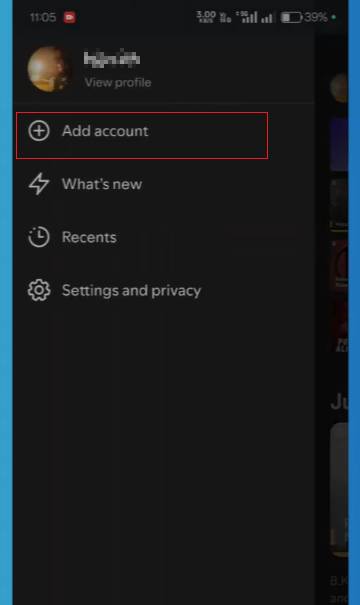
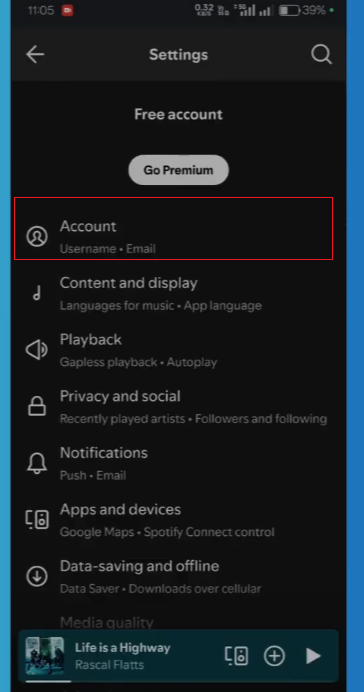
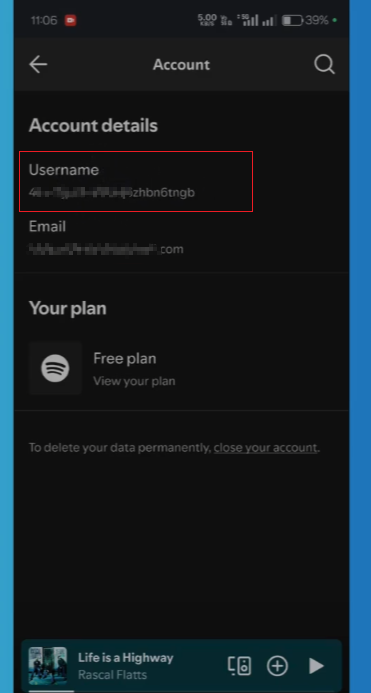
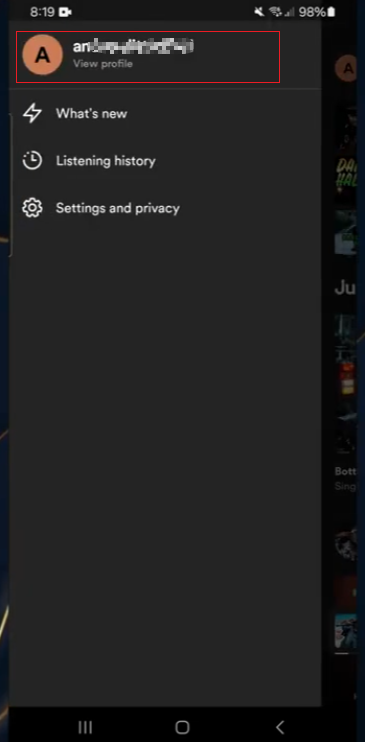
On Mobile App:
- Open Spotify.
- Go to Settings.
- Tap on your profile or account section.
- Look for “Username” under account details.
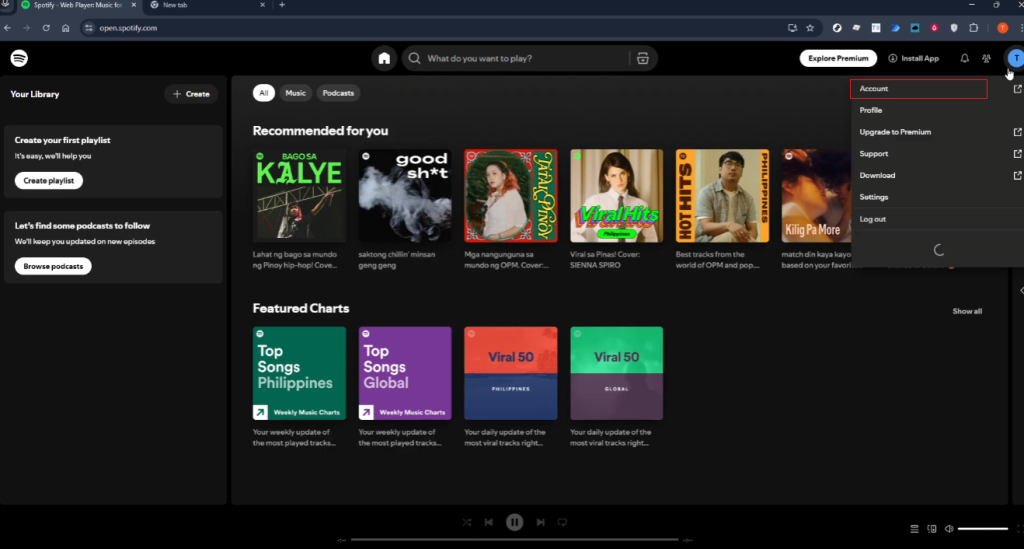
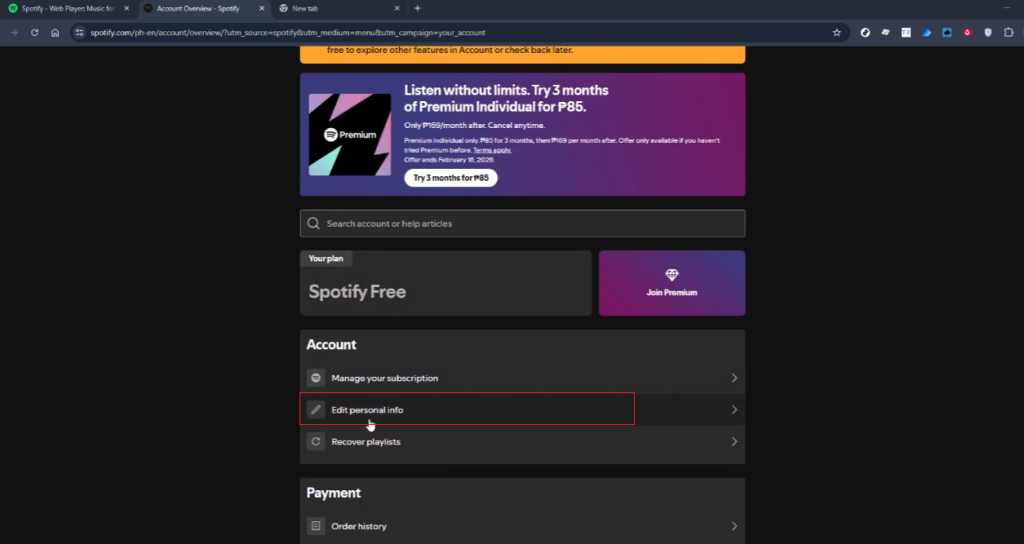
On Desktop App:
- Open Spotify on your computer.
- Click your profile name in the top right.
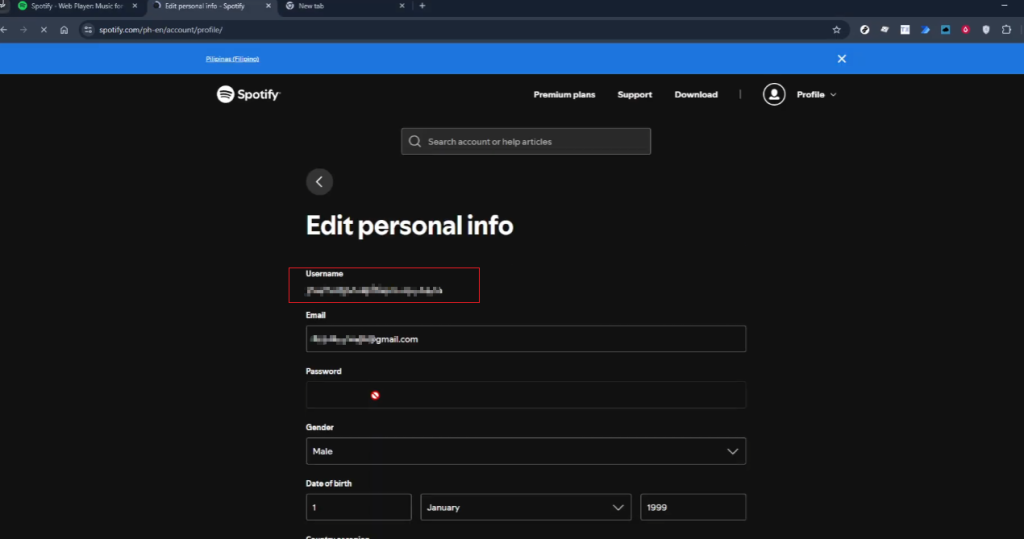
- Go to Account.
- Your username will appear in account information.
Using Profile Link:
Another simple way is:
- Open your profile.
- Click “Share” → “Copy link to profile.”
- The link usually contains your unique Spotify ID.
How to Change Account Name in Spotify
If your goal is to make your profile easier to find, changing your display name is more useful than changing your username.
Here’s how you can update it:
- Open Spotify app.
- Go to Settings.
- Tap your profile.
- Select Edit Profile.
- Change your display name.
- Save the changes.
After this, your new name will appear to anyone who visits your profile.
A clear and simple display name helps others recognize you faster, especially when you share playlists or collaborate with friends.
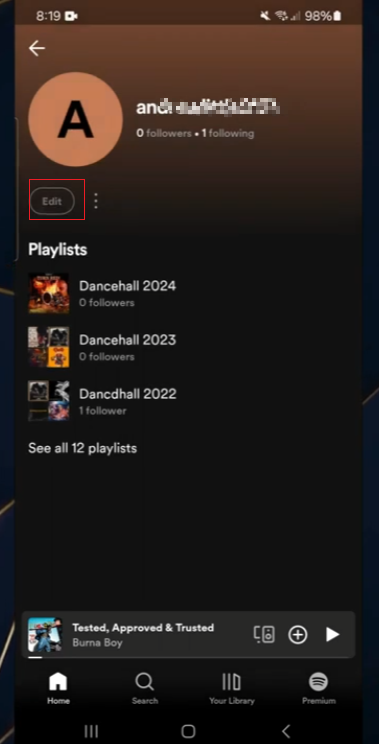
How to Share Your Spotify Profile
If your goal is to let others find you, sharing your profile is the easiest method:
- Open your profile page
- Tap or click Share
- Copy the link or send it directly through messaging apps
You can also share:
- Individual playlists
- Artist pages you like
- Collaborative playlists
This makes your Spotify presence more visible without needing to explain your username.
Why People Search for Spotify Usernames
There are several practical reasons why users search for Spotify usernames. Although most interactions today rely on display names and profile links, usernames still matter in some situations.
1. Adding or identifying a specific account
Some users search for usernames when adding friends to ensure they are adding the right person. This method is especially useful when multiple people have similar display names.
2. Account recovery or support needs
In some cases, users may need to enter their username when viewing account details or verifying their identity in account settings. This helps confirm whether the account’s ownership is correct.
3. Connecting across devices or platforms
People sometimes use Spotify on different devices, and usernames can help match accounts when logging in or troubleshooting cross-platform access issues.
4. Sharing profiles in a precise way
While profile links are common, some users still mention usernames when discussing accounts in messages or forums, especially when they want a simple identifier rather than a full link.
5. Playlist collaboration and organization
When using shared playlists or collaborative music playlists on Spotify, users can clearly identify contributors by their usernames.
6. Avoiding confusion with similar display names
Display names are easily duplicated. Usernames, on the other hand, are unique to each account, which helps avoid confusion when looking for a specific person.
Tips to Make Your Spotify Profile Easier to Find
If you want more people to discover your Spotify profile, some small details can have a huge impact. This is not just about usernames, but also about how profiles are displayed, their names, and how often they are shared, including how to find spotify username, but also how your profile appears in search results and recommendations. Here are some practical ways to increase your visibility and make it easier for users to search for and recognize your account.
1. Use a simple and readable display name
A clear display name helps others remember you more quickly. Avoid using names that are too long, contain too many symbols, or are difficult to type. If friends want to search for you, a concise name can reduce errors and make your profile easier to find.
2. Add a recognizable profile picture
Your profile picture defines your account identity. It doesn’t need to be complicated; it just needs to be clear and easy to recognize at a glance. Many users remember faces or simple icons faster than words, especially when browsing search results or sharing links.
3. Keep your profile active with playlists
Regular updates can enrich your profile. You can create playlists based on your mood, music genre, or daily listening history. An active playlist makes your profile more appealing and easier to get attention or shares when other people browse your page.
4. Make playlists public and well-organized
Sharing your playlist is one of the easiest ways for others to find you without having to search for your name directly. Use clear and concise titles such as “Morning Retreat” or “Workout Playlist” instead of adding random words. A well-organized personal profile can also leave a more lasting impression.
5. Share your profile link in multiple places
Instead of relying solely on search, sharing your profile link will be more effective. You can send the link via instant messaging apps, add it to your social media profile, or share it in group chats. The more links you have, the easier it is for others to find you directly.
6. Stay consistent with your online identity
If possible, try to use similar usernames on different platforms. When people recognize your name elsewhere, they are more likely to search for you on Spotify and quickly connect the two.
7. Interact with other users’ playlists
Following playlists and artists, or collaborating with friends to create playlists, can increase your visibility on the platform. This will also make your profile appear in shared feeds, which can bring more exposure over time.
Final Thoughts
Spotify usernames are primarily used for backend management, while display names and profile links are the real ways people find each other. Once you understand the difference between the two, managing your profile and sharing your musical tastes with others becomes much easier.
If your goal is to connect and discover new friends, then you should focus on your display name, profile sharing, and playlist activity.


