
Want to seamlessly connect Spotify to Instagram and share Spotify song on Instagram stories, notes, or bio? This comprehensive guide covers official linking methods, troubleshooting tips for spotify not linking to instagram errors, and an objective look at our spotify premium mod apk 2026, which enhance social sharing capabilities while unlocking all Premium features at no cost.
Why Link Spotify to Instagram
Connecting these two platforms offers multiple benefits:
- Share music effortlessly: Post tracks, albums, and playlists to Instagram Stories, Reels, and Notes with one tap
- Boost engagement: Add interactive music stickers that let followers play songs directly in Spotify
- Showcase taste: Display your favorite music on your Instagram profile for followers to discover
- Cross-promote: Artists can drive streams to their Spotify releases through Instagram’s massive audience
Instagram stands out as one of the most visual social platforms for broadcasting your music picks. If you want even more methods to send playlists and tracks directly to close contacts, check out our companion post: 8 Easy Ways to Share Your Spotify Soundtrack with Friend.
How to Connect Spotify to Instagram
There are two primary ways to connect Spotify to Instagram using official app features:
Method 1: Link via Instagram Settings
- Open Instagram and tap your Profile icon
- Tap the menu in the top right corner
- Go to Settings and privacy > Your app and media > App and website permissions
- Select Spotify from the list
- Follow the login prompts to authorize Instagram to access your Spotify account
- Confirm the connection
Method 2: Contextual Linking
The easiest way to link accounts is during the sharing process:
- Open Spotify and find the song/album/playlist you want to share
- Tap the three dots or Share icon
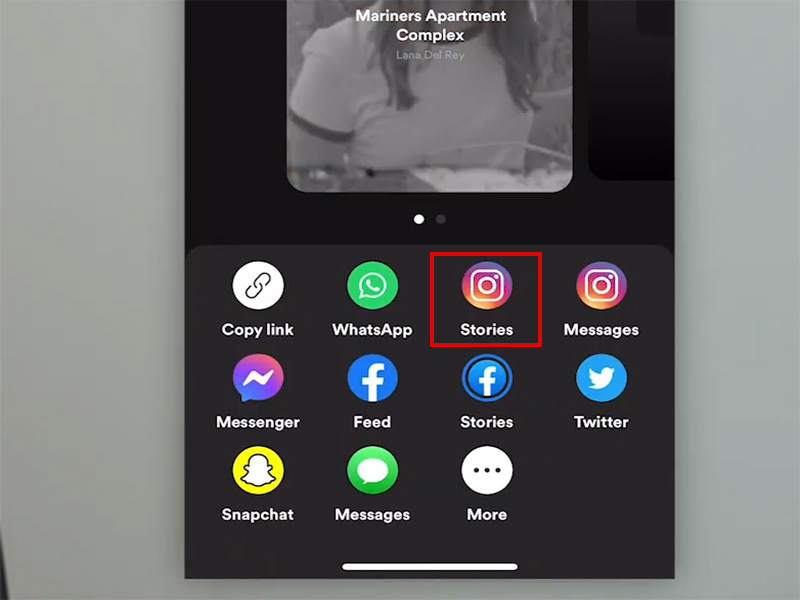
- Select Instagram Stories or Instagram Notes from the sharing menu
- If not already linked, Instagram will prompt you to connect your Spotify account
- Log in and authorize
How to Share Spotify Song on Instagram
Once linked, sharing music is simple across Instagram features:
1. Share to Instagram Stories
- In Spotify, navigate to your desired content and tap Share
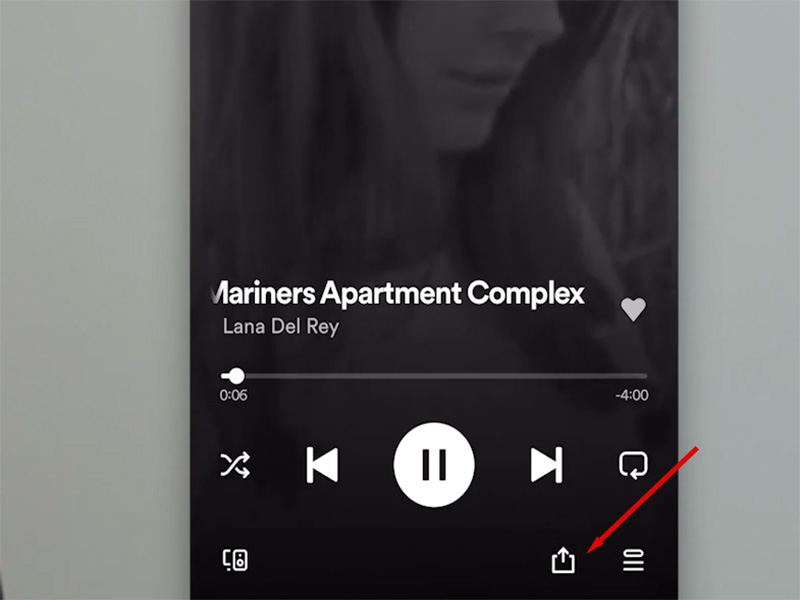
- Select Instagram Stories; this opens Instagram with a pre-made music sticker
- Customize your story: Add text, stickers, or drawings
- Tap Your Story to post. Followers can tap the sticker to open the song in Spotify
2. Share to Instagram Notes
- Open Instagram and go to your Direct Messages
- Tap + to create a new Note
- Tap the music icon and select Spotify
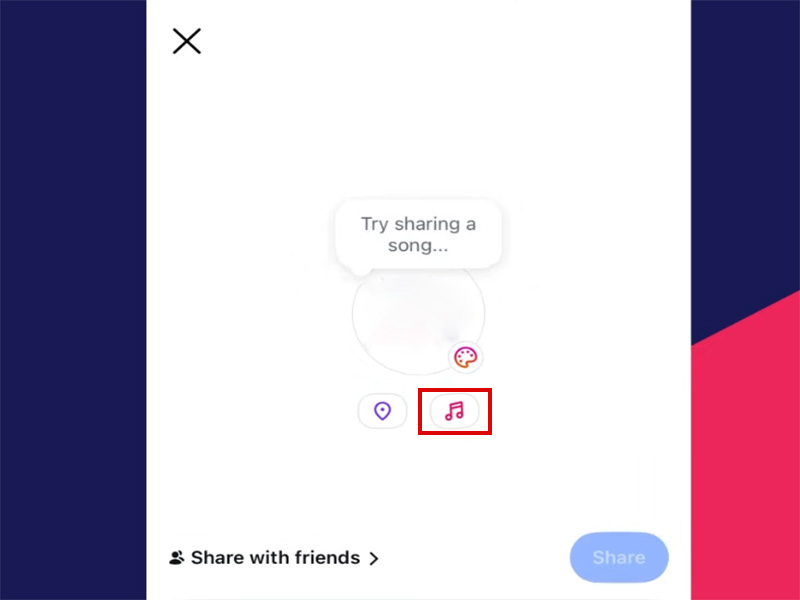
- Search for a song and select it. Your Note will show live playback controls
- Post your Note. Followers can listen to a 30-second preview directly in Instagram
3. Add Spotify Link to Instagram Bio
- In Spotify, tap Share on your desired content and select Copy link
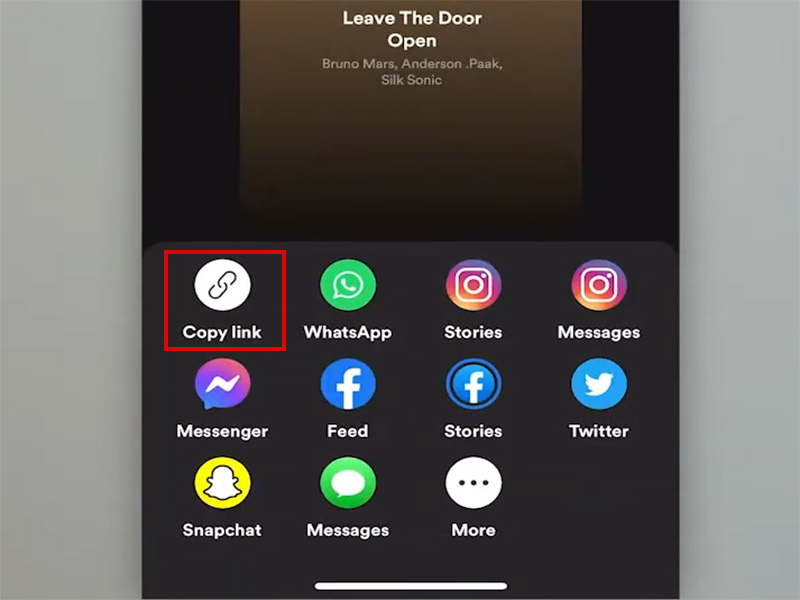
- Open Instagram and go to Edit Profile
- Paste the link in the Website field and tap Done
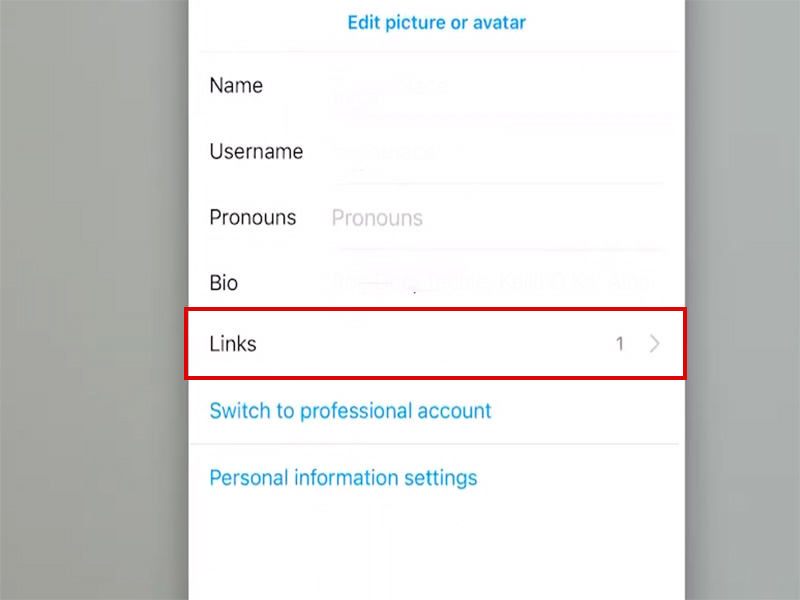
- Your followers can now tap the link to open your music in Spotify
Troubleshooting: Spotify Not Linking to Instagram
Experiencing spotify not linking to instagram issues? Try these proven fixes:
1. No “Instagram Stories” option
- Update Spotify and Instagram to latest versions
- Restart your device
- Check if Instagram Music is available in your country
2. Connection fails during authorization
- Log out of both apps and log back in
- Clear app cache for both apps
- Reinstall both apps for a clean connection
3. Shared link doesn’t work for followers
- Ensure content is publicly available on Spotify
- Check if the song is licensed in their country
- Temporarily make your profile public
4. Instagram crashes when sharing
- Update your phone’s operating system
- Free up storage space
- Disable other apps running in the background
5. Advanced Fixes for Persistent Issues
- Check App Permissions: Ensure Spotify has permission to open other apps
- Reauthorize Connection: In Instagram Settings, remove Spotify and reconnect from scratch
- Use a Secondary Account: Test with a different Spotify/Instagram account to isolate the issue
- Check Server Status: Verify both platforms are operational via their status pages
Official Spotify Limitations for Social Sharing
Despite the official features, Spotify has notable restrictions:
- Sharing Limits: Only 15-second previews can be shared due to licensing agreements
- No Direct Feed Posts: You can’t share music directly to your Instagram Feed—only Stories, Reels, and Notes
- Spotify Free Restrictions: Free users have limited sharing options and may see ads in shared content
- Region Locked: Some sharing features are unavailable in certain countries
For a more flexible sharing experience, our spotify premium mod apk 2026 offers compelling advantages.
Spotify Premium Mod APK 2026: Enhanced Sharing & Full Premium Access
Our optimized spotify premium apk latest version build on the official app to deliver:
1. Core Advantages for Social Sharing
- Unlimited High-Quality Sharing: Share full 30-second previews
- Unlocked Canvas Sharing: Include dynamic Canvas loops in Instagram Stories for eye-catching posts
- No Ad Interruptions: Shared content never includes ads, improving follower experience
- Enhanced Privacy Controls: Share privately without affecting your main listening history
- All Premium Features: Enjoy ad-free listening, unlimited skips, offline downloads, and high-quality audio alongside sharing perks
2. How to Install Our Spotify Premium APK Latest Version
- Download spotify premium mod apk 2026 from our website
- Enable “Unknown Sources” in Android settings
- Install the APK and log in with your Spotify account
- Open any song and tap Share—you’ll see enhanced sharing options including:
- High-quality Canvas sharing to Instagram Stories
- 30-second previews for all shared content
- Ad-free sharing cards
- Enjoy seamless connect Spotify to Instagram integration with all Premium features!
Expert Tips for Maximizing Spotify-Instagram Integration
- Curate Shareable Playlists: Create themed playlistsfor frequent sharing
- Combine with Visuals: Add custom backgrounds to your Instagram Stories to make music stickers stand out
- Use Spotify Codes: Include Spotify Codes in your Instagram posts for easy scanning and streaming
- Leverage Notes Feature: Share your current favorite tracks in Instagram Notes for real-time engagement
- Update Regularly: Keep both apps and your spotify premium apk latest version updated for the best sharing experience
Final Thoughts
Linking Spotify to Instagram unlocks powerful social sharing capabilities, but official limitations can hold you back. For unlimited sharing options, ad-free content, and all Premium features, our spotify premium mod apk 2026 offers the ultimate solution.
Evaluate your sharing needs and account safety preferences to choose the best method. Ready to take your music sharing to the next level? Download our spotify premium apk latest version today and start sharing your favorite tracks with the world!


