
Previously, we shared a complete tutorial on how do you clear Spotify queue to help you organize your upcoming playback and resolve common queue errors. Now we’re tackling another essential Spotify management topic for daily users: controlling and deleting your playback records. Concerned about your music habits being tracked? Want to clear spotify listening history or remove spotify recently played items for privacy reasons? This comprehensive guide explores official methods to manage your Spotify history through spotify privacy settings, plus an objective look at our spotify premium mod apk 2026, which offer enhanced privacy controls and history management features unavailable in the official app.
Understanding Spotify History Types & Official Limitations
Before diving into solutions, let’s clarify what “Spotify history” includes and what you can and cannot officially delete:
| History Type | What It Tracks | Official Deletion Capability |
| Recently Played | Tracks, albums, and playlists you’ve listened to | Remove individual items |
| Search History | Your search queries in the app | Full clearing available |
| Listening History | Comprehensive data for recommendations | Cannot be fully deleted—only hidden or excluded |
| Cache Data | Temporary files for faster playback | Can be cleared without affecting history |
Critical Fact: As of 2026, Spotify does not offer a universal “clear all” option for your entire listening history or Recently Played list. Official tools only let you remove individual items or hide activity.
How to Clear Spotify History: Official Methods
Follow these step-by-step instructions to manage your Spotify history using official features and spotify privacy settings:
1. Clear Spotify Search History
Clearing search history is straightforward and fully supported:
- Open Spotify and tap the Search icon
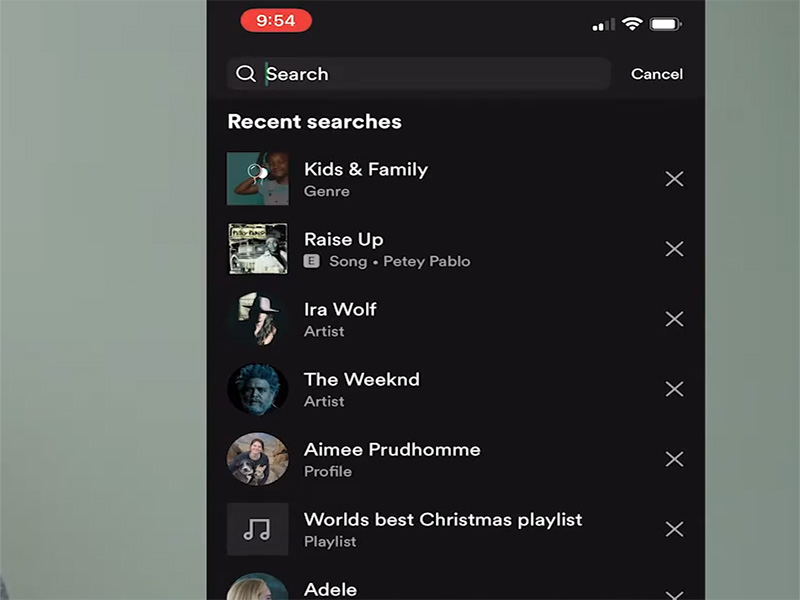
- Scroll to the bottom of your recent searches
- Tap Clear recent searches (mobile) or Clear all (desktop)
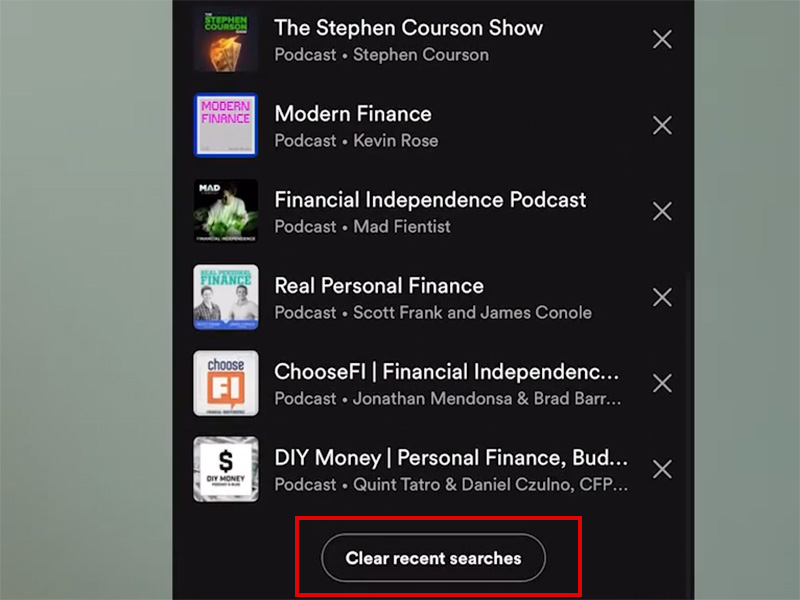
- Confirm to delete your entire search history
This removes all visible search queries instantly without affecting your listening data.
2. Remove Individual Items from Recently Played
While you can’t clear the entire list, you can delete specific entries:
Mobile (iOS/Android):
- Go to Home tab and scroll to Recently Played
- Tap the three dots next to the item you want to remove
- Select Remove from Recently Played
- Repeat for each track/album/playlist
Desktop:
- Find Recently Played in the left sidebar
- Hover over the item and click the three dots
- Choose Remove from Recently Played
- Confirm if prompted
Note: Availability of this feature may vary by region, app version, and account type.
3. Manage Listening History via Spotify Privacy Settings
Control who sees your activity and how it influences recommendations:
- Tap your profile icon > Settings
- Navigate to Social section
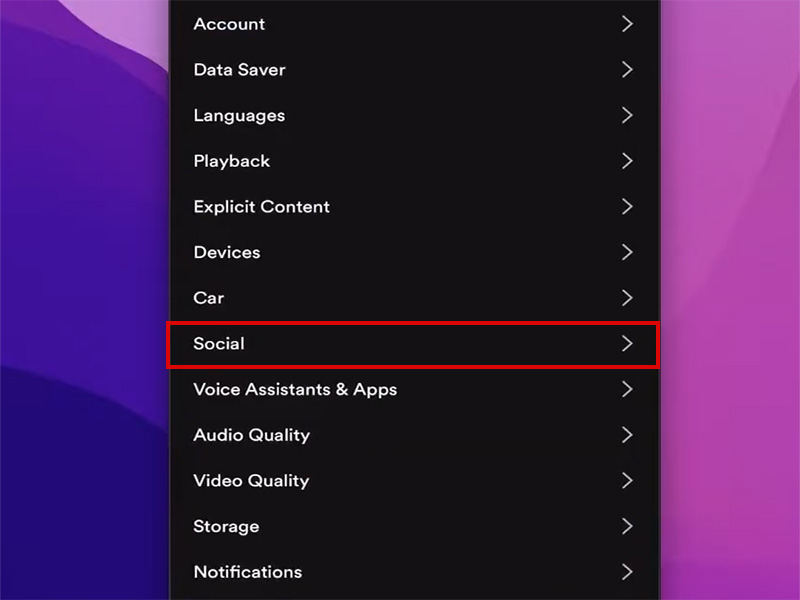
- Hide activity from followers: Toggle off “Share my listening activity on Spotify”
- Remove recent artist visibility: Disable “On your profile, people can see the artists you recently listened to”
- Prevent recommendation influence: Toggle on Private Session. Music played won’t affect your taste profile
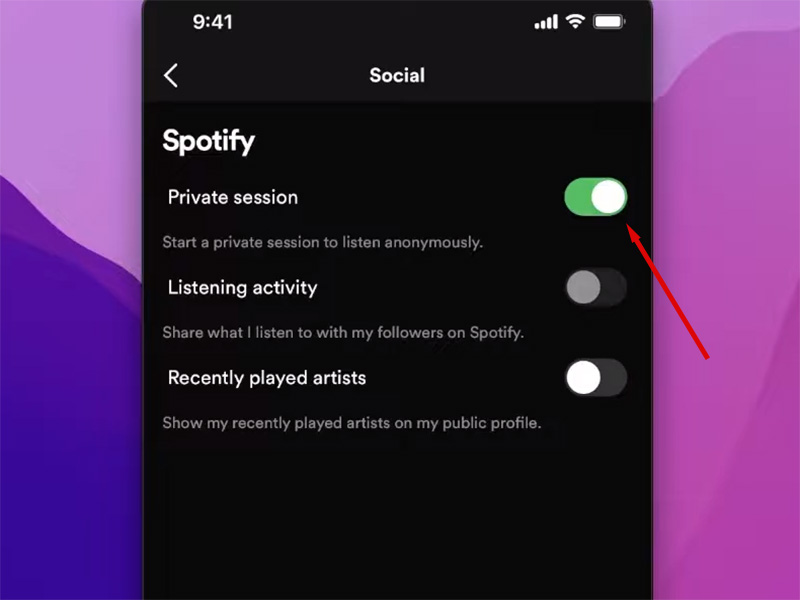
Private Session is ideal for listening to music you don’t want in your history, but it turns off automatically after 6 hours of inactivity.
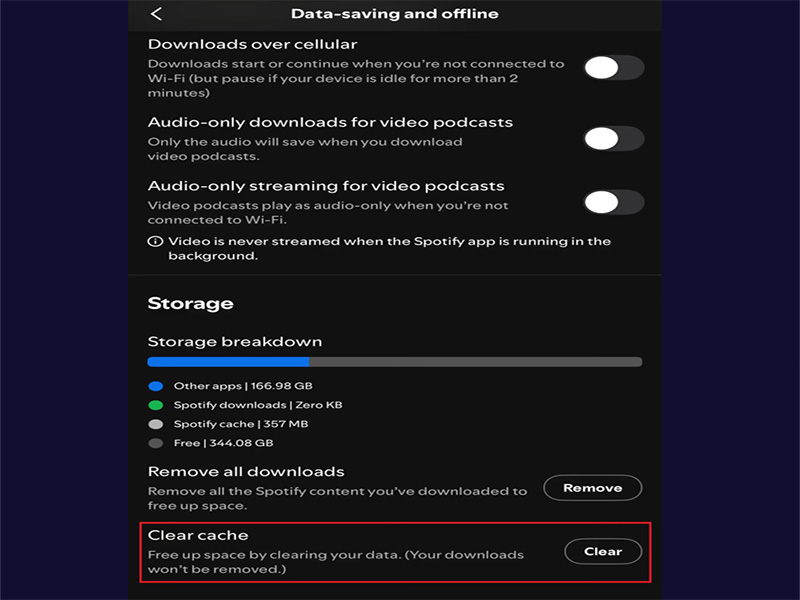
4. Clear Spotify Cache
While clearing cache doesn’t delete your history, it removes temporary files that might contain playback data:
- Android: Settings > Apps > Spotify > Storage > Clear Cache
- iOS: Uninstall and reinstall Spotify
- Desktop: Settings > Show Advanced Settings > Clear Cache
5. Advanced Privacy Controls
Official Spotify Premium doesn’t add history-clearing features, but it does offer:
- Downloaded content: Listen offline without new history entries
- Higher priority support: Faster assistance with privacy concerns
- Better data management: More granular control over your taste profile
Why Official Spotify Falls Short for History Management
Despite these tools, official Spotify has significant limitations:
- No bulk deletion: Removing items from Recently Played requires tedious repetition
- Permanent listening data: Spotify retains comprehensive listening history for algorithm training
- Private Session limits: Auto-disables after 6 hours, leaving gaps in privacy protection
- No full history reset: The only way to erase all data is to delete your account entirely
For users seeking complete control over their listening history, our spotify premium apk latest version offer compelling solutions.
Spotify Premium Mod APK 2026: Enhanced History & Privacy Control
Our optimized spotify premium mod apk 2026 builds on the official app’s foundation to deliver advanced history management and privacy features—alongside all Premium perks—at no cost.
1. Core Advantages of Our Spotify Premium Mod APK
- Bulk History Clearing: Delete entire Recently Played lists or search history with one tap
- Persistent Private Mode: Stay in private listening indefinitely; no auto-disabling after 6 hours
- History Auto-Deletion: Schedule automatic clearing of search/recently played data
- Enhanced Privacy Settings: Block all listening data collection that influences recommendations
- Premium Unlocked: Enjoy ad-free listening, unlimited skips, offline downloads, and high-quality audio alongside privacy features
2. Objective Risk-Benefit Analysis
| Aspect | Official Spotify | Spotify Premium Mod APK 2026 |
| History Control | Limited to individual deletions | Full clear spotify listening history and remove spotify recently played bulk options |
| Privacy Features | Basic Private Session | Persistent private mode + auto-deletion |
| Cost | $12.99/month (The price may vary due to promotions and regions. Please check the latest pricing on the official website) | Free |
| Account Safety | 100% safe | Moderate risk |
| Ease of Use | Manual processes | One-tap history management |
| Stability | Always stable | Updated weekly for compatibility |
Important Reminder: Third-party mod APKs violate Spotify’s Terms of Service and may lead to account suspension. We recommend using a secondary account to protect your main profile. All files on our platform are virus-scanned for safety.
How to Install Our Spotify Premium APK Latest Version
- Download spotify premium mod apk 2026 from our website
- Enable “Unknown Sources” in Android settings
- Install the APK and log in with your Spotify account
- Open Settings > Privacy & History to access:
- Bulk delete for spotify listening history and recently played
- Persistent private mode toggle
- Auto-deletion scheduling
- Enjoy complete history control with all Premium features unlocked!
Expert Tips for Maintaining Spotify Privacy
- Use Private Session Strategically: Activate it for sensitive listening
- Regular History Maintenance: Clear search history monthly and remove unwanted Recently Played items weekly
- Manage Taste Profile: Exclude playlists from recommendations
- Secondary Account for Mod APK: Protect your main account by using a separate profile with the modded app
- Update Frequently: Keep your spotify premium apk latest version updated for the best privacy features and compatibility
Final Thoughts
Official Spotify offers basic tools to clear spotify listening history and remove spotify recently played items, but they’re limited and time-consuming. For complete privacy control, including bulk deletion, persistent private mode, and auto-clearing. Our spotify premium mod apk 2026 delivers unmatched functionality alongside all Premium perks.
Evaluate your privacy needs and technical comfort to choose the best solution. Ready to take charge of your listening data? Download our spotify premium apk latest version today and enjoy music without privacy compromises!


