
Your phone number can help you log in, restore your account, and use some features on Spotify that require phone verification. However, many users are unsure whether they can add a second phone number to the same account, or how to manage their current number.
Spotify does not offer an option to directly add multiple phone numbers to the same account. In most cases, a Spotify account can only be linked to one phone number at a time. If you want to use a different number, you will need to replace your existing number or update your login method.
In the previous article, we talked about the methods to search for people on Spotify. This guide will explain how Spotify’s phone number works, how to change your current number, and what you can do if you want to use a different phone number for your account.
Can You Add Another Phone Number to Your Spotify Account
Spotify does not support adding multiple phone numbers to a single account. A phone number is the only way to link an account, so you can’t simply add a second number as an additional contact method. If you are creating a new account through spotify sign up, you need to use a different phone number or another available registration option instead of trying to attach multiple numbers to the same profile.
If you have already linked a phone number to your Spotify account and wish to use a different number, you will need to update your account information and replace the old number with the new one.
For example, if you have changed your phone number, cannot access your previous number, or want to log in with a different number, updating your account settings is the correct procedure.
Why Do Users Want to Add Another Phone Number
There are many reasons why Spotify users want to add other phone numbers or replace the numbers already linked to their accounts. In most cases, these situations occur after changes to personal contact information or replacement of equipment, making it important to keep your Spotify phone details up to date so you can continue signing in, verifying your account, and managing your profile without unnecessary interruptions.
Some of the most common reasons include:
- Getting a new mobile number. Many people switch to a new phone number after changing carriers or buying a new SIM card.
- Changing from a work number to a personal number. A number used for work may no longer be available after changing jobs, so users prefer to connect a personal number instead.
- Moving to another country or region. People who relocate often get a local phone number and want their Spotify account to match their current contact information.
- Keeping account details up to date. Some users regularly review their account settings and update old information so everything stays current.
- Using a different login method. Users may want to switch from one phone number to another to make signing in more convenient on a new device.
- Managing multiple accounts. Some people have separate Spotify accounts for personal and family use and want each account to have its own contact information.
Regardless of the reason, updating your phone number can simplify account management. At the same time, it ensures your account information is accurate, making it easier for you to access your Spotify profile and continue enjoying your playlists, saved songs, and personalized recommendations without creating a new account.
How to Change the Phone Number on Spotify
If you wish to use a new mobile number, you will need to update the current number associated with your account. You can usually do this through your Spotify account page.
Follow these steps:
- Open a browser and go to the Spotify account page.
- Log in with your Spotify account details.
- Open the account settings section.
- Find the phone number option.
- Select the option to change or update your phone number.
- Enter your new phone number.
- Complete the verification process if required.
- Save the changes.
After updating the number, your new phone number will become the main number connected to your Spotify account.
How to Add a Phone Number When You Sign Up for Spotify
If you haven’t linked a phone number yet, you can add it during the account creation process.
The basic steps are:
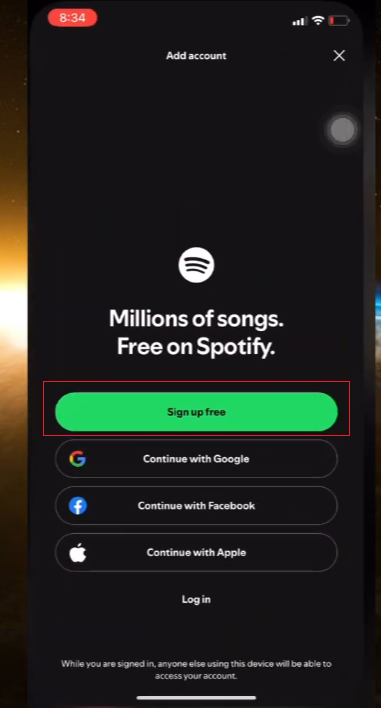
- Open the Spotify app or website.
- Choose the sign-up option.
- Select phone number registration if available.
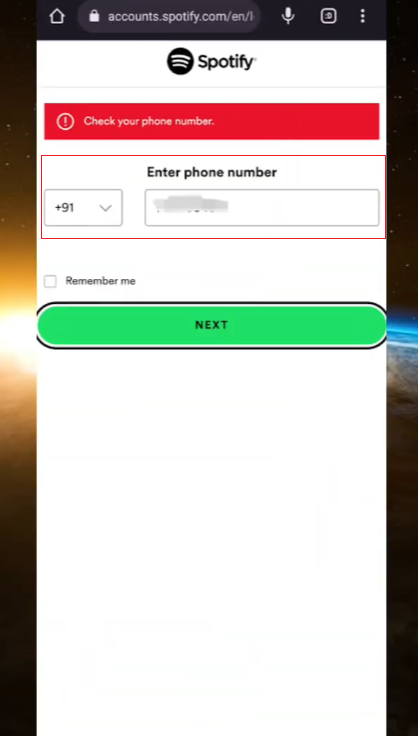
- Enter your phone number.
- Follow the instructions to complete account creation.
Once the account is created, the phone number becomes connected to that Spotify profile.
What Happens After Changing Your Spotify Phone Number
Your Spotify account will remain unchanged after you update your phone number. If you need to manage your account details during the process, make sure you use the correct information when you spotify register or update your profile. Your playlists, saved songs, podcasts, followers, and account settings will not be affected. You can continue listening on all your devices without losing your saved content.
The main change is that your new mobile number will be linked to your account for future verification or mobile-based login functionality (if any). It is recommended that you check your account details after making the change to ensure that the new number has been saved correctly.
How to Remove an Old Phone Number from Spotify
If you no longer use your previous phone number, updating your account information is the best way to remove the old connection.
You can:
- Open your Spotify account settings.
- Find your phone number information.
- Replace the old number with your current number.
- Save the updated information.
If you no longer need to log in with your mobile number, you can also view other available account login methods and choose the option that best suits you.
How to Check Which Phone Number Is Connected to Spotify
If you are not sure which number is linked to your account, you can check your account information.
Steps:
- Visit the Spotify account page.
- Log in to your account.
- Open your profile or account details.
- Review the available account information.
This helps you confirm whether your current phone number is still correct.
Common Problems When Changing a Spotify Phone Number
Some users may have trouble updating their phone number. Common issues include:
The Old Phone Number Is No Longer Available
If you are unable to access your previous number, please check if you can update your account using other available login methods (such as your email address).
The New Number Cannot Be Added
Please ensure that the number format is correct and that the entered mobile phone number is valid. Incorrect information may prevent the update from completing.
Account Information Is Not Updating
Sometimes changes may take some time to take effect on all devices. Logging out and logging back in can help refresh your account information.
Tips for Managing Your Spotify Account Information
To keep your Spotify account easy to access, consider these simple practices:
- Keep your email address updated.
- Use a phone number that you currently use.
- Review your account information from time to time.
- Remember your login details.
- Avoid creating unnecessary duplicate accounts.
Good account management helps you organize your playlists, subscriptions, and personal settings.
Frequently Asked Questions
Can I add two phone numbers to one Spotify account?
No, Spotify does not support linking multiple phone numbers to the same account. If you want to use a new number, you will need to replace your existing number.
How do I change my Spotify phone number?
You can change it by updating your current phone number in your Spotify account settings.
Will changing my phone number delete my Spotify playlists?
No. Changing your phone number will only update your account information. Your playlists, saved music, and profile data will remain unchanged.
Can I create a Spotify account without a phone number?
Yes. Spotify supports different registration methods, including email-based account creation.
What should I do if I changed my phone number?
Please update your Spotify account as soon as possible using your new phone number to ensure your account information is up-to-date.
Final Words
Because Spotify only allows one phone number to be linked at a time, you cannot add other phone numbers to your Spotify account. If you need to use a different number, you can update the existing phone number connected to your spotify account through your account settings. This allows you to keep your login information current and continue using Spotify services with the new number.
Keeping your Spotify information up-to-date helps you manage your account more easily and keeps your login information neat and organized. Whether you’ve changed your phone number or simply want to update your account information, changing the associated phone number is very easy.


