
Spotify playlists are not just for saving songs. Many users create playlists to share their musical tastes, favorite artists, moods, or personal collections. Sometimes you might come across an interesting playlist and wonder who created it. Finding the playlist creator can help you explore more music, follow the creator, or meet people with similar tastes. In some cases, the creator may also have a Spotify artist account, which allows you to discover more of their music, releases, and other content connected to their profile. Understanding how to find playlist owners can make it easier to explore Spotify’s music community and connect with users who share your interests.
However, Spotify does not always display user information directly. The method for finding a user’s profile depends on whether the playlist is public, shared, or associated with a visible account. This guide will introduce different ways to find your Spotify profile through a specific playlist.
Can You Find a Spotify Profile From a Playlist
Yes, Spotify user profiles can usually be found by publicly sharing playlists. Spotify displays the playlist creator’s username below the playlist title; clicking or tapping the username will open the profile.
Once you enter the creator’s profile, you can view their public playlists, follow their account, and discover more music based on their preferences.
However, if the playlist is private, created by Spotify, or the user’s profile information is limited, you may not be able to find the user’s profile on Spotify through the playlist, as there may not be enough public details available to identify the account owner.
Method 1: Open the Playlist Creator’s Profile Directly
The easiest way to find someone through a Spotify playlist is to open the creator’s profile from the playlist page.
On Mobile:
- Launch the Spotify app.
- Search for the playlist you want to check.
- Open the playlist.
- Tap the creator’s name below the playlist title.
- Spotify will take you to the profile page.
On Desktop:
- Open Spotify on your computer.
- Go to the playlist.
- Click the username shown under the playlist name.
- The creator’s profile will open in a new page.
Once you enter their profile page, you can view their public playlists, and if you like their music selections, you can also follow their account.
Method 2: Search for the Playlist Name on Spotify
Sometimes, you might only remember the name of a playlist, but not the playlist link. In this situation, Spotify’s search function can be helpful.
Follow these steps:
- Open Spotify.
- Enter the playlist name in the search bar.
- Select the “Playlists” category.
- Find the matching playlist.
- Open it and check the creator information.
Please note that many playlists may have very similar names. Checking the playlist cover art, song list, and number of followers can help you find the right playlist.
Method 3: Use a Shared Playlist Link
If someone sends you a Spotify playlist link, you can usually find the creator through that link.
After opening the link:
- The playlist page will appear.
- Check the creator name under the playlist title.
- Select the username to open the profile.
This method is very useful when you find a playlist on social media, in forums, or through friend recommendations.
Method 4: Find a Profile Through a Collaborative Playlist
Collaborative playlists work differently because multiple users can add songs, which means the playlist history may include contributions from several people. If you find a collaborative playlist, the creator may not be the only person associated with that playlist, so using a Spotify profile view can help you explore the related profiles and better understand who is involved in creating and managing the music collection.
To check:
- Open the playlist.
- Look for the playlist owner.
- Check the profiles of users who added songs if their information is available.
Collaborative playlists are typically created for groups, friends, or shared music collections, so they may contain multiple contributors.
Why Can’t I See the Playlist Creator’s Profile
Sometimes, you open a playlist but can’t find any information about the creator. There are usually several reasons for this.
The Playlist Is Created by Spotify
Some playlists are created by Spotify itself, such as those based on music trends, genres, or listening habits. These playlists are not for regular users.
The User Has Limited Public Information
Some Spotify users simplify their profiles and don’t add any personal information. Their profiles may only show the username and public playlists.
The Playlist Is Private
Typically, Spotify search cannot find private playlists. You need a direct link provided by the list owner to access them.
The Playlist Was Shared Without the Original Profile
Sometimes, playlist links are copied or forwarded, but the creator’s information is not displayed. In this situation, finding the original account may be quite difficult.
How to Search for a Spotify User by Username
If you know someone’s Spotify username, you can search their profile directly through the app. This method is very effective when you already have the username from playlists, social media profiles, or shared links. Similar to the process of creating and managing a music presence when you make a Spotify artist account, finding a user’s profile only requires entering the correct username in the search bar and checking the matching results. This allows you to quickly locate the right account and explore their public playlists, saved tracks, and other available details.
Follow these steps:
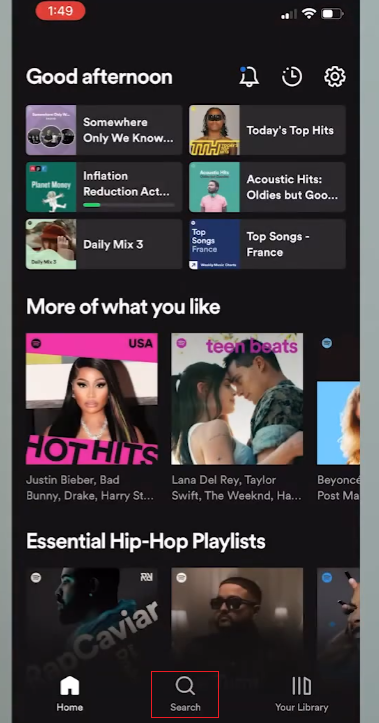
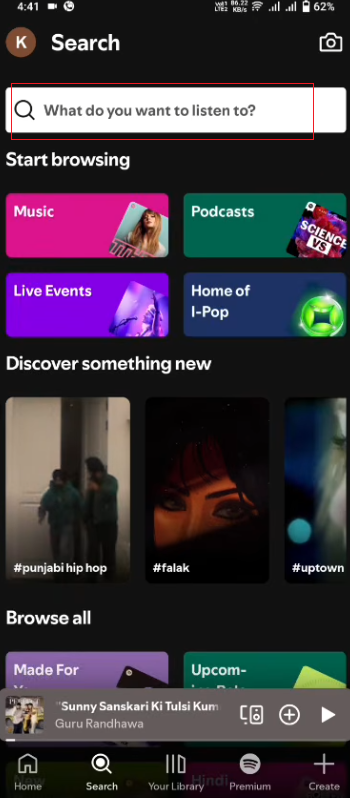
- Open the Spotify app.
- Tap the search bar at the top.
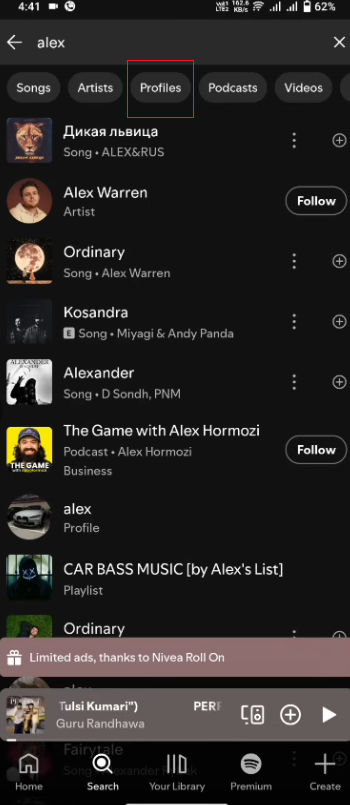
- Enter the username or related keywords.
- Select the Profiles section from the search results.
- Open the matching account to view the user’s public playlists.
Please note that Spotify usernames are not always easy to remember, as many accounts use random names. If you can’t find the exact profile, try searching with different keywords, or check details such as profile picture, playlist name, and music preferences to identify the correct account.
How to Use a Playlist to Discover Similar Users
Finding playlist creators is not just about finding one person; it can also help you discover more music communities.
After opening someone’s profile, you can:
- Explore their other playlists.
- Find new artists.
- Follow music collections with similar styles.
- Discover users who share similar music interests.
Many Spotify users create playlists around specific themes, such as workout music, relaxing songs, travel playlists, or favorite songs from certain years.
Tips for Finding the Right Spotify Profile
When searching for Spotify users by playlist, you may encounter multiple users with similar names or multiple playlists with the same title. Looking at some additional information can help you find the right creator more easily.
Check the Playlist Cover and Description
The cover image and description of a playlist can provide useful clues. Many users will choose to customize the cover art or write a short description to explain the purpose of the playlist.
Check the Number of Followers and Playlist Activity
The number of followers and recent activity levels can also help you compare different accounts.
A playlist with a large following likely belongs to an active user who frequently shares music. You can also check if new songs are frequently added to the playlist. Recently updated playlists are more likely to belong to active accounts.
Explore the User’s Other Public Playlists
Once you find someone you like, don’t just look at one playlist. Open the user’s profile and take a look at their other public playlists.
If multiple playlists have similar names, themes, or musical styles, this helps confirm that you’ve found the right people.
Use the Exact Playlist Link When Possible
If you receive a playlist from a friend, website, or social media post, using the original Spotify link is usually the fastest way to find the creator.
A direct link will take you to the desired playlist instead of displaying multiple search results. From there, you can open the creator’s profile and browse more content.
Compare the Playlist Creation Time
The creation time of the playlist is also a useful clue. If you remember when you first saw the playlist or when you shared it, you can compare that information with the user’s other playlists.
Avoid Relying on Only One Detail
Username or playlist name alone may not be enough to find the right user. Many users may use similar usernames, and popular playlists often have the same names repeatedly.
Therefore, it is recommended to combine other information, such as playlist name, cover image, songs, description, and profile activity. Taking a comprehensive approach to various factors can increase the likelihood of finding the right Spotify users.
Conclusion
Finding someone’s profile through a specific Spotify playlist is usually quite straightforward. The main method is to open the playlist and select the creator’s username. If you only know the playlist name, Spotify search and share links can also help you find the account.
While not every playlist will lead to a visible user profile, public playlists usually contain enough information to allow you to explore the creator’s music collection. These methods allow you to discover new users, find more playlists, and meet others through shared musical interests.


