
Spotify offers users a variety of ways to control their listening experience, including creating private playlists. Many users use Spotify Premium to enjoy more features, but they may still wonder if their playlists can be seen by others. For those who prefer to keep their music choices personal, a private Spotify setup can help maintain better control over what others can access. If you have personal songs, favorite albums, or playlists that you don’t want to share with others, then understanding Spotify’s privacy settings is especially important.
Spotify’s private playlists are designed to limit visibility. However, playlist privacy is not the only factor affecting who can find or access your music. Your account settings, playlist sharing options, and past actions can also affect your privacy.
This guide will explain whether others can access your Spotify Premium private playlists, how Spotify playlist privacy works, and how to make your Spotify account more private.
Can Others See My Private Spotify Premium Playlist
No, other users generally cannot see your Spotify private playlists. Once you set a playlist to private, it will not appear in your public profile, search results, or follower feed. Only you can view and manage this playlist in your account.
Whether you’re using the free version of Spotify or Spotify Premium, the privacy settings for playlists are the same. Having a Premium membership does not automatically set your playlists to private or public. Privacy settings depend on how you manage each playlist.
How Does Spotify Private Playlist Work
Spotify’s private playlist feature allows you to hide your music collection from other users. When a playlist is set to private, it will not appear in your public profile, follower list, or Spotify search results. For users who want more control over their listening activity, using a private session on Spotify can also help keep recently played songs and personal music choices away from others while enjoying the platform more privately.
You can still use the playlist normally. You can add new songs, delete songs, change the order, and listen at any time. The playlist will be saved in your account, but only you will be able to see it unless you choose to share it.
Private playlists are very useful if you want to organize your personal music, save songs for later listening, or create playlists that suit your taste without sharing them with others. If you later decide to share the playlist, you can change its settings and make it public again.
Private playlists are useful in many situations. Some users create private playlists to organize songs for personal moments, save music they are listening to, or collect songs before deciding whether to share them publicly.
Can Followers See My Private Playlist on Spotify
No, your followers usually won’t see playlists that you’ve marked as private. After following your account, others will only be able to see the information you choose to display publicly.
Your followers may see:
- Your public playlists
- Your public profile information
- Your listening activity if you have enabled sharing features
They won’t see your private playlists in your profile.
If you frequently create playlists but don’t want others to know your musical preferences, then setting these playlists to private is the simplest solution.
Can I Make My Spotify Account Private
Yes, you can increase the privacy of your Spotify account by changing your account and social settings. While Spotify doesn’t offer a button to completely hide your account with a single click, you can control various privacy options to decide what content other users can see.
By adjusting these settings, you can limit the visibility of playlists, hide your listening activity, and make your music preferences more private. This is very useful if you want to enjoy music without sharing your listening habits with your followers or other Spotify users.
Here are some ways to make your Spotify account more private:
1. Hide Your Listening Activity
Spotify allows users to share their recent listening history with others. If you enable this feature, people who follow you may be able to see the songs you are currently playing or have recently listened to.
Turning off the listening history feature can reduce the exposure of your music habits, providing you with a more private listening experience.
2. Make Your Playlists Private
Playlists are one of the main parts of a Spotify profile that other users can see. If you don’t want other people to see certain playlists, you can change them from public to private.
Private playlists are typically not displayed in your profile, allowing you to hide your personal song collection while still having access to them at any time.
3. Control Your Public Profile
Your Spotify profile displays information such as your username, avatar, and public playlists. Viewing your profile settings can help you decide which information you allow other users to access.
If you primarily use Spotify for personal listening, limiting the amount of your profile information that is publicly available can provide a cleaner, more private experience.
4. Turn Off Social Sharing Features
Spotify includes social features that allow users to connect and share music events. If you do not want to share your listening habits, you can disable the relevant sharing options in the settings.
This gives you more control over how others see your Spotify activity.
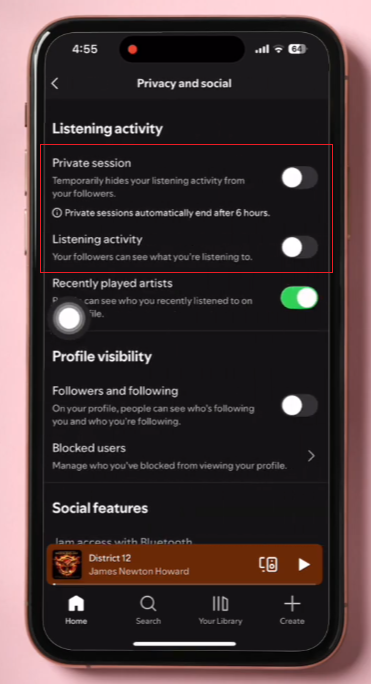
5. Use Private Session When Needed
Spotify also offers a “private conversation” option. Once enabled, your current listening activity will not be shared with your followers for a period of time.
You can customize your Spotify experience to better suit your privacy needs by adjusting playlist visibility, profile information, and event sharing settings.
How to Make Your Account Private on Spotify
You can improve the privacy level of your Spotify account by changing a few settings in the Spotify app. Menu names may vary depending on the device, but the overall steps are similar.
Step 1: Open Spotify Settings
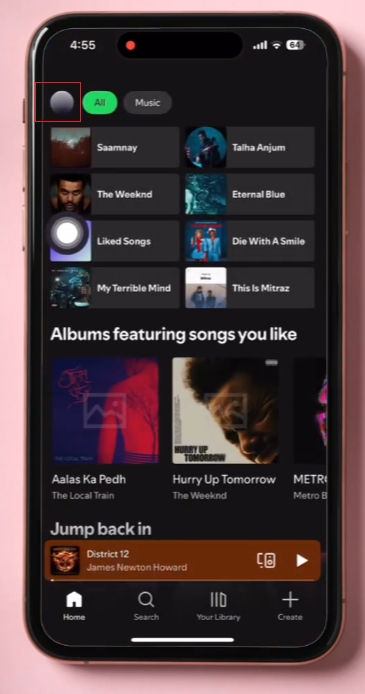
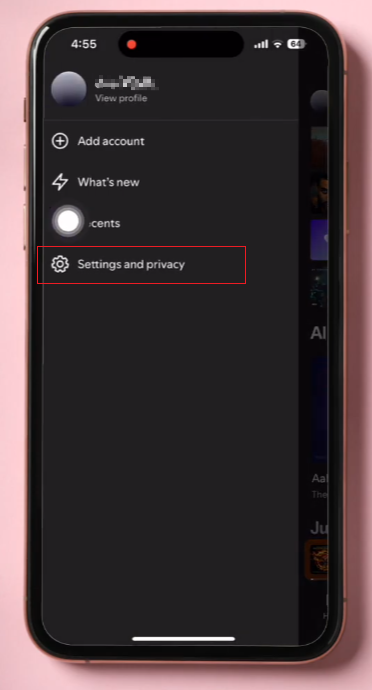
Open the Spotify app on your phone or computer. Click on your profile picture, then select the settings option.
Step 2: Adjust Social Settings
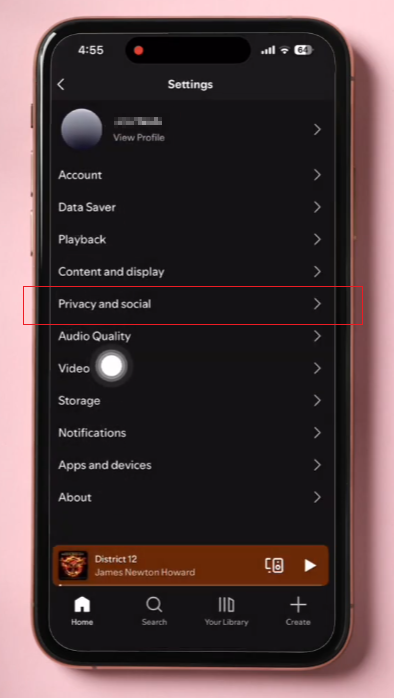
Find the privacy or social settings. Here, you can manage options related to listening to events and sharing your profile.
You can turn off the feature that allows others to view your recent listening activity. This helps protect your music habits and makes them more private.
Step 3: Set Your Playlists as Private
To make an individual playlist private:
- Open the playlist you want to hide.
- Select the menu option.
- Choose the option to make the playlist private.
After this change, the playlist will no longer appear publicly on your profile.
Step 4: Review Your Public Profile
View your Spotify profile to see what information other users can see. Delete or hide any content you don’t want to share.
Regularly checking these settings can help you better manage your Spotify account.
How to Check If a Spotify Playlist Is Private
If you are unsure whether a playlist is private, you can check it in the playlist menu.
Private playlists are usually displayed as private in the playlist settings. If this option allows you to set it to public, then the playlist is currently a private playlist.
Checking your playlists is especially useful if you have created many. Some older playlists may still use the settings you selected when you initially created them.
Private Playlist vs Public Playlist on Spotify
The main difference between private and public playlists is visibility.
| Feature | Private Playlist | Public Playlist |
| Visible on profile | No | Yes |
| Appears in search | No | Possible |
| Followers can view it | No | Yes |
| Can be shared | Only with a shared link | Yes |
| Personal use | Best choice | Better for sharing |
Private playlists are better suited for personal music collections, while public playlists are better suited for sharing your musical tastes with others.
Why Should You Keep Some Spotify Playlists Private
There are many reasons why users choose private playlists.
1. Personal Music Collection
Some playlists are for personal enjoyment only. You can save songs based on your mood, memories, or daily habits without letting others see them.
2. Testing New Songs
Many users create temporary playlists when they discover new music. Setting your playlist to private allows you to organize your songs before sharing them.
3. Better Control Over Your Profile
Your Spotify profile reflects your music taste. By setting certain playlists to private, you can decide which information is publicly displayed.
4. Organizing Music More Easily
Private playlists can also be used as personal folders. You can create playlists for different events without worrying about what others think of them.
Final Thoughts
Normally, other users cannot view your Spotify Premium private playlists. Spotify treats private playlists as personal collections and they will not appear in your public profile or search results.
However, playlist privacy settings depend on your settings and sharing options. If you want to have more control over your Spotify activity and enjoy a more personal experience with private listening spotify, check your playlist visibility, adjust your account privacy settings, and make your private playlists private.
Whether you’re using Spotify Premium or the free version, managing your privacy settings is the best way to create a more personalized listening experience.


