
Many users like Spotify because of its huge music library, personalized recommendations, and convenient playlist management features. However, some people may switch to Apple Music because of its sound quality, support for Apple devices, or integration with the Apple ecosystem. When moving between services, one common concern is how to transfer favorite songs, albums, and a spotify playlist without spending time rebuilding collections manually. With the right transfer tools, users can quickly move their music library and continue enjoying their personalized listening experience on Apple Music.
While Spotify and Apple Music don’t offer built-in transfer functionality, some third-party tools can help you quickly migrate your music collection. In previous articles, we shared ways to listen to Spotify Premium together long-distance. This guide will show you the best ways to transfer Spotify songs and playlists to Apple Music, how these tools work, and how to manage playlists after the transfer.
Why Transfer Spotify Playlists to Apple Music
There are many reasons why users choose to migrate their Spotify music library to Apple Music. Some users have purchased iPhones, iPads, or Macs and expect the music service to run smoothly on all their Apple devices. Other users may prefer Apple Music because of its audio features, interface, or association with an existing Apple account.
Manually searching for and re-adding each song can be very time-consuming, especially if you have saved hundreds of songs or carefully created playlists. For users who want a more flexible way to manage their music collection, a Spotify playlist download option can help organize playlists before transferring them. The playlist migration tool simplifies the process by matching songs from Spotify with the Apple Music library, allowing you to move your favorite tracks without repeating the entire search process manually.
A successful transfer can help you keep:
- Favorite songs
- Custom playlists
- Album collections
- Artist lists
- Music discovery history
However, because Spotify and Apple Music have different music libraries, some songs may not be a perfect match during the transfer process.
What You Need Before Transferring Spotify Music to Apple Music
Before moving your playlists, prepare a few things:
1. Active Spotify and Apple Music Accounts
You need to have access to both platforms. Your Spotify account contains the playlists you want to migrate, and your Apple Music account will receive the migrated songs.
2. Stable Internet Connection
Playlist transfer services need to compare music information across different platforms. A stable connection helps speed up the transmission process.
3. A Playlist Transfer Tool
Since Spotify and Apple Music do not offer a direct migration service, users typically rely on services that connect the two accounts and copy playlist information.
Popular playlist transfer services include:
- SongShift
- Soundiiz
- TuneMyMusic
These tools can recognize songs from Spotify playlists and search for the same tracks on Apple Music.
Best Ways to Transfer Spotify Songs and Playlists to Apple Music
There are several methods available depending on your device and personal needs.
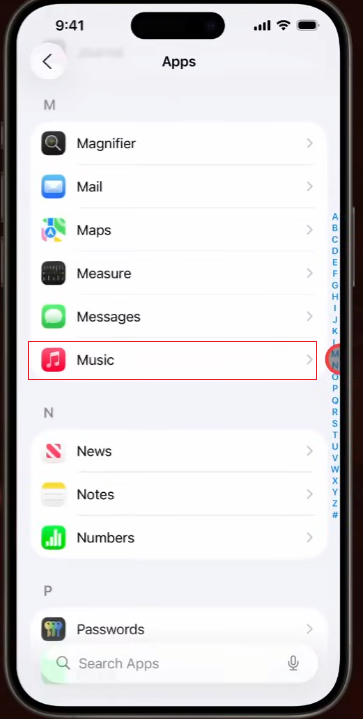
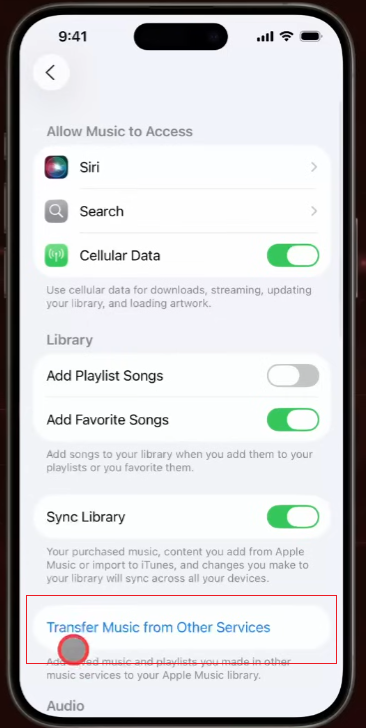
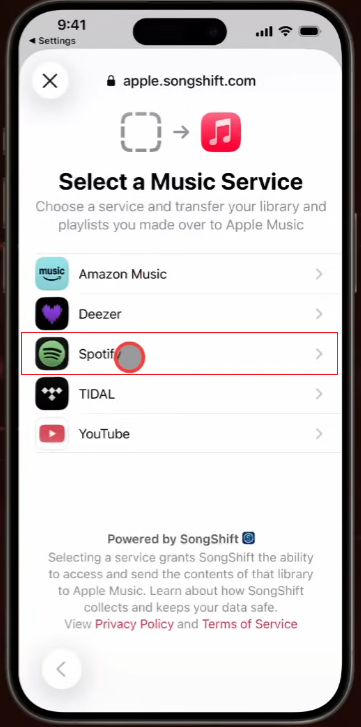
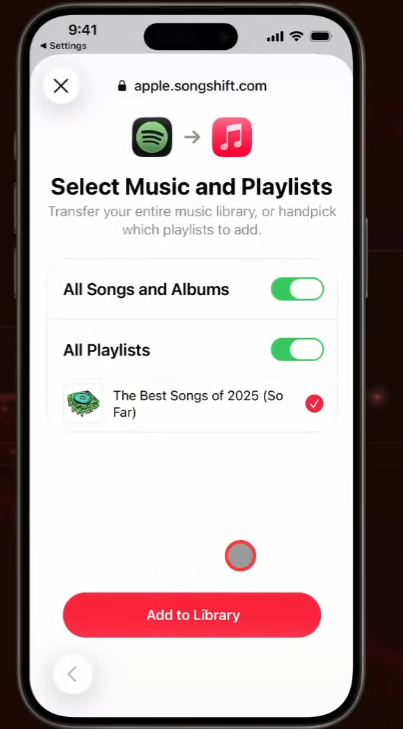
Method 1: Transfer Spotify Playlists with SongShift
SongShift is a popular choice for iPhone users to transfer playlists between different music platforms.
Steps:
- Download SongShift on your iPhone.
- Connect your Spotify and Apple Music accounts.
- Select Spotify as the source service.
- Choose the playlists you want to transfer.
- Select Apple Music as the destination.
- Start the transfer process.
- Review matched songs and save the playlist.
One useful feature of SongShift is that it allows users to check song matching before the transfer is complete. This helps in organizing playlists.
Method 2: Use Soundiiz to Move Spotify Playlists
Soundiiz runs through a web browser, supports multiple music platforms, and is very useful for users who manage multiple streaming services.
The basic process is:
- Open Soundiiz.
- Connect your Spotify account.
- Select your playlists.
- Choose Apple Music as the destination.
- Confirm the transfer.
Soundiiz is helpful for users with many playlists because it allows bulk transfers.
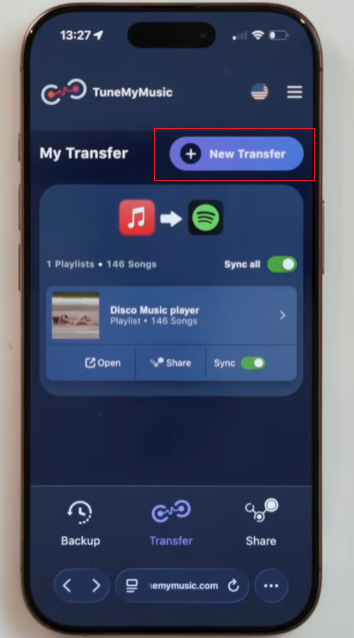
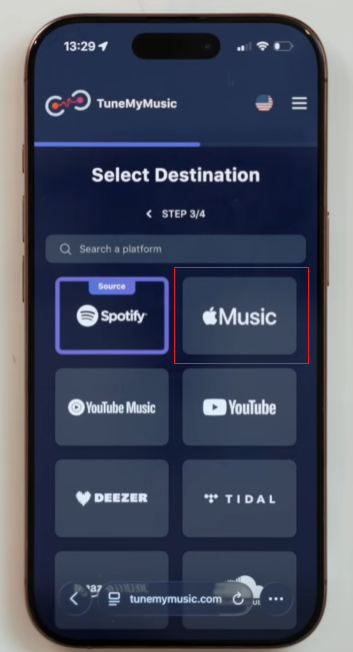
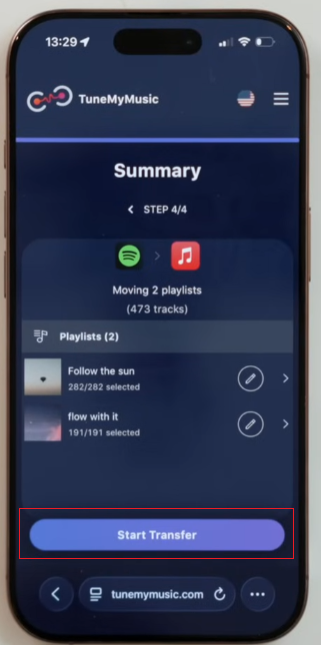
Method 3: Transfer Music with TuneMyMusic
TuneMyMusic provides a simple way to upload playlists online.
To use it:
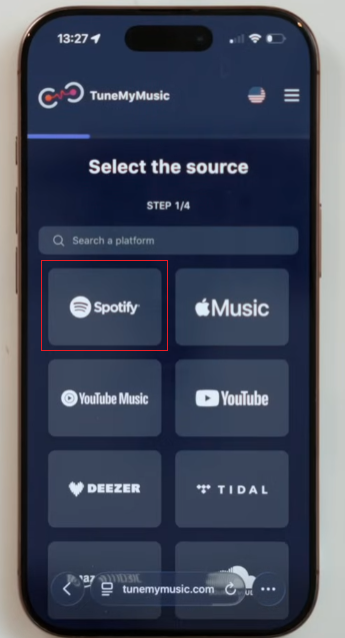
- Visit TuneMyMusic.
- Choose Spotify as the source.
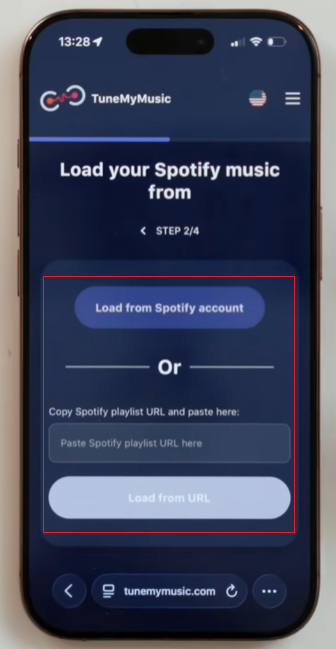
- Select playlists from your Spotify account.
- Choose Apple Music as the target platform.
- Start transferring your music.
This method is convenient because it does not require installing an app.
How to Check Your Transferred Apple Music Playlist
After transferring Spotify playlists to Apple Music, it is important to review the results.
Check the following:
- Are all songs available?
- Are song titles matched correctly?
- Are duplicate tracks included?
- Are playlist names still correct?
Sometimes a song may appear in different versions, such as a live recording, a remix, or an album version. After using a spotify to apple music playlist converter to move your playlists, checking the transferred music helps you find duplicate tracks, missing songs, or incorrect versions, keeping your music library tidy and organized.
How to Create a Playlist on Spotify
Before migrating playlists, many users organize their Spotify music library by creating custom playlists. A well-organized playlist can make the migration process much easier.
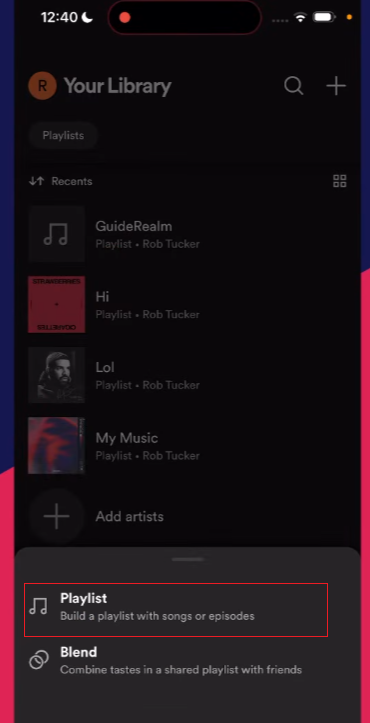
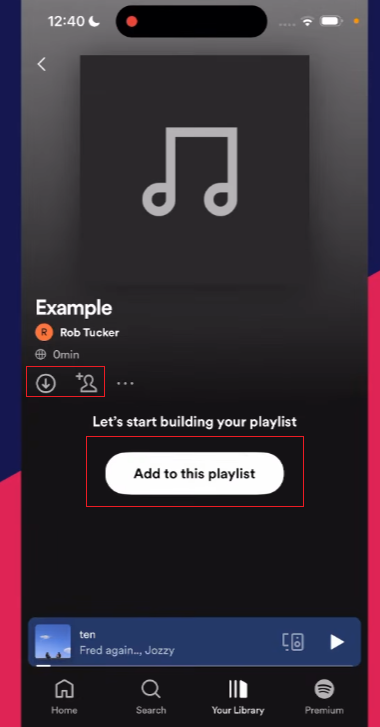
Here is how to create a playlist on Spotify:
- Open the Spotify app.
- Go to your Library.
- Select “Create Playlist.”
- Add a playlist name.
- Add songs, albums, or artists.
- Edit the playlist whenever you want.
You can create different playlists based on your music habits, such as:
- Workout songs
- Travel music
- Relaxing tracks
- Favorite albums
- New discoveries
A clear playlist structure also helps you decide which music you want to move to Apple Music.

How to Add YouTube Music to Spotify Playlist
Many users collect music from different platforms, including YouTube Music. If you want to merge songs from YouTube Music with songs from your Spotify playlist, you’ll need a music transfer tool that supports both services.
The general process includes:
- Choose a playlist transfer service that supports YouTube Music and Spotify.
- Connect your YouTube Music account.
- Select the playlist you want to move.
- Choose Spotify as the destination.
- Review the matched songs.
- Save the new Spotify playlist.
This method is very useful when you find some songs on YouTube Music but prefer to listen to them on Spotify. After transferring these songs to Spotify, you can later transfer the playlist to Apple Music.
How Long Does Spotify to Apple Music Transfer Take
The transfer time depends on several factors:
- Number of songs in the playlist
- Internet speed
- Transfer service performance
- Number of playlists being moved
A small playlist containing dozens of songs can be completed quickly, while a large music collection containing thousands of songs may take much longer.
For better results, transferring playlists one by one makes it easier to check each collection.
Tips for Keeping Your Music Library Organized After Moving
After switching to Apple Music, developing some simple habits can help you better manage your music library.
1. Remove Duplicate Playlists
If the same playlist is transferred multiple times, duplicate files may be created. Please delete any unnecessary copies to keep your media library tidy.
2. Update Playlist Names
Some playlist names may not be fully copied. Please rename them if necessary for easier searching.
3. Add Missing Songs Manually
If some tracks don’t match, please search for them directly in Apple Music and add them manually.
4. Create New Playlists
Migrating to a new platform is also a good opportunity to reorganize the music. You can create new playlists based on your current listening habits.
Frequently Asked Questions
1. Can I transfer Spotify playlists to Apple Music for free?
Some file transfer tools offer free file transfer services, but there may be limitations, such as a limit on the number of songs or playlists. Larger music libraries may require additional features.
2. Will my Spotify playlists disappear after transfer?
No. Moving a playlist will create a copy on Apple Music. Your existing Spotify playlists are still available.
3. Do Spotify and Apple Music have the same songs?
Both platforms have huge music libraries, but their tracks are not exactly the same. Some songs may only exist on one platform.
4. Can I transfer Spotify playlists to Apple Music on Android?
Yes. Some web-based delivery services can be used on different devices. The availability of an application depends on the specific delivery method.
Conclusions
Migrating from Spotify to Apple Music doesn’t mean your music library has to start from scratch. With playlist migration tools like SongShift, Soundiiz, and TuneMyMusic, you can quickly transfer your favorite songs and playlists, including your personal spotify music playlist, between platforms while keeping your listening experience organized and uninterrupted.
Before migrating, please organize your Spotify playlists and delete unnecessary tracks. After migrating, check your Apple Music library and make some tweaks to ensure everything is easy to manage.
Whether you’re permanently switching platforms or just want to try out new features of Apple Music, migrating playlists can save you time and help you keep the music you already love.


