
Spotify DJ is designed to be a smart music companion, not a complicated tool. The more precisely you guide it, the smoother and more natural the music playback will be. If you’re learning how to prompt Spotify DJ on PC, you’ll quickly discover that the key isn’t issuing perfect commands, but rather clearly guiding your mood, habits, and rhythm. Once you understand how it works, you can turn it into an incredibly precise personal DJ.
Understand What Spotify DJ Listens To
Spotify DJs don’t actually understand language like humans; they focus on patterns. Every action you take will send a signal, and some signals are stronger than others. Understanding which signals are important can help you guide the DJ without fighting them.
The strongest signal is your recent listening behavior. The songs you’ve played in the last few days are more important than the songs you liked a few years ago. If you’re wondering if you can DJ with Spotify, the answer is yes. Spotify DJs pay close attention to your current playback. If you suddenly start repeatedly playing a new genre or style of music, it will see it as a genuine shift in your taste, not a one-off experiment.
The act of skipping songs is another key factor. Skipping the first few seconds of a song is a clear negative sign. Skipping near the end of a song, while less intense, still makes sense. Even if you don’t like it, playing a song in its entirety can tell the DJ that it matches your current mood.
Actions such as liking, saving, and adding to playlists have long-term effects. These actions will affect your overall profile, not just your current playback history. This is why some songs will still appear in DJ patterns even if you haven’t played them recently.
Spotify DJs also consider the playback context. The time of day, device type, and playback duration all affect its recommendations. Playing music for a short time on a mobile phone usually triggers some familiar or safe recommendations, while playing it for a long time on a computer or smart speaker brings more choices and exploration.
One drawback of DJ is that it is not very good at handling mixed signals. If you switch to completely different music styles in a short period of time, the system will have difficulty determining your preferences. This often results in overly generic or repetitive recommendations.
Spotify DJs focus more on your actions than your words. Your habits are its prompts, which is why many users ask, can you DJ with Spotify in a more personal way. The clearer and more consistent your behavior, the more precise and natural the DJ experience will be.
Start With Clear Music Intent
Before turning on Spotify DJ, take some time to think about what kind of listening experience you want. Spotify DJ performs best when your goals are simple and clear. This could be focused music for work, upbeat tracks for exercise, or soothing tunes for relaxation. The clearer your intentions are, the easier it will be for the DJ to understand and execute them.
A common mistake is expecting Spotify DJs to instantly understand your mood, while you keep changing your music style. If you start with soothing music and then suddenly switch to upbeat or fast-paced tracks, the DJ receives conflicting signals. This often results in inaccurate recommendations and disorganized playlists.
To clarify your intentions, play one or two songs that perfectly match your current mood before activating DJ mode. These initial tracks can serve as a reference. After that, avoid frequently switching music genres. Give the DJ some time to respond and adjust based on the songs you play, skip, or like.
In addition, the context must be considered. The time of day, activities, and even location can influence which type of music is most suitable. Although Spotify DJs don’t directly read these factors, your listening habits often reflect them. Aligning your listening intentions with your actual situation helps the DJ maintain peak performance throughout the performance.
Treat each DJ performance as a carefully curated experience, not as a random play. Defining the musical direction from the outset leads to a smoother transition, higher-quality song selection, and a more personalized DJ experience.
Use Actions as Prompts
For Spotify DJs, your actions are far more important than any setting. Every click you make will be considered as feedback. The system observes your actions and adjusts the music accordingly, usually after just a few songs.
Skipping a song is your strongest signal. If you skip within the first few seconds of a song, Spotify AI DJs’ recommendations will immediately adjust, and the Spotify DJs will quickly learn that the song or style isn’t what you’re looking for at the moment. Frequently skipping quickly tells the DJ to avoid similar music playing in the current session.
On the other hand, playing a song in its entirety sends a positive signal. The impact is even stronger when replaying or adding it to a favorites list. These actions tell the DJs that this type of music suits your mood and should be played more frequently.
Timing is also important. If you skip the song near the end, the signal strength will be weaker than if you skip it earlier. Skipping ahead usually means the song is completely unsuitable for your current mood, while delaying skipping might simply mean you want to try something different.
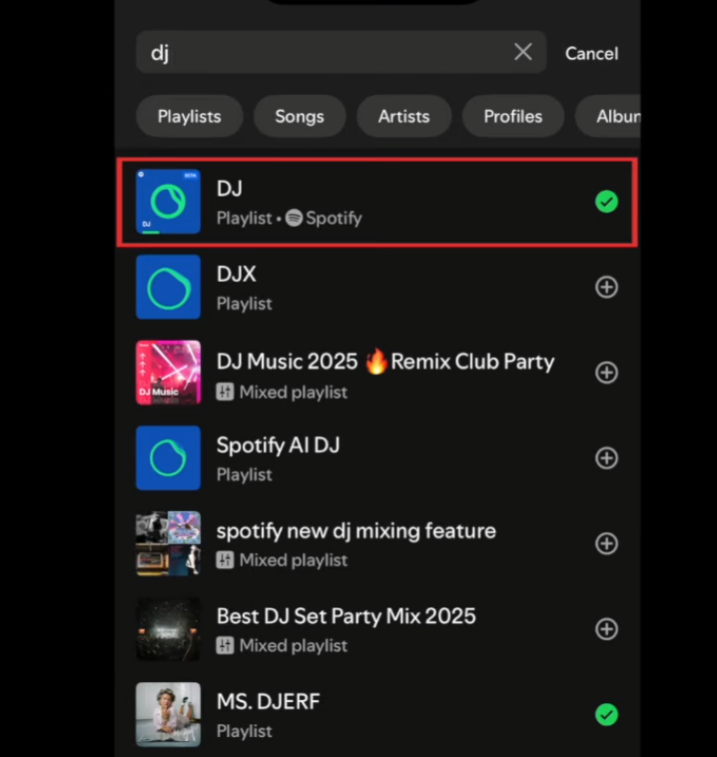
You can also manually select one or two songs before activating DJ mode to guide the Spotify DJs. This is like preparing a warm-up song for the DJ. The system will use these initial choices as a reference and build the entire DJ segment around them.
Switching playlists during a DJ performance is another clever tip. If you jump to a specific playlist, the DJ will notice. When you return to DJ mode, it will usually continue playing in a similar way.
The key is to be conscious of your actions. Don’t skip songs randomly; instead, treat your actions as signals. With continuous feedback, Spotify DJ can adapt more quickly and provide a smoother, more precise listening experience.
Refresh the DJ When Needed
Even with good tips, Spotify DJs can sometimes go against your expectations. This is normal. Music algorithms operate based on probability rather than intent, so slight adjustments can help DJs readjust to your current mood.
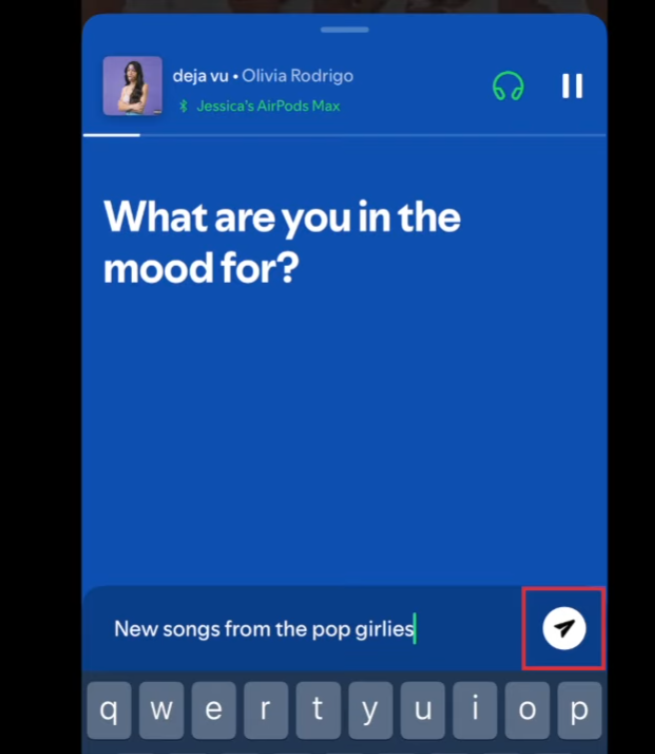
An effective way to refresh the DJ is to briefly exit DJ mode. Pause playback and manually play one or two songs that clearly represent what you want to hear next. You can think of these tracks as a soft spotify ai dj prompt, giving the system a clear hint about your current mood and preferences. These songs should fit the theme perfectly, rather than being forced or misplaced. After playing them for a short while, restart DJ mode. This provides the system with a clear and up-to-date signal.
Timing is also important. It’s best to refresh after playing a few songs, rather than refreshing after each song you don’t like. If the refresh is too frequent, the DJ won’t have enough data to make adjustments. Let it play three to five songs before deciding whether adjustments are needed.
Another useful tip is to refresh based on energy level rather than music genre. For example, if the DJ is playing the right type of music but the rhythm feels off, you can play a song with the energy level you want and then turn DJ mode back on. The algorithm is very sensitive to tempo and intensity, sometimes even more so than style.
If you use Spotify DJ at different times of the day, the refresh feature helps differentiate between different listening scenarios. Manually resetting it at night can prevent DJs from carrying over high-intensity playback habits from the daytime into the more relaxed evening.
In short, refreshing the DJ isn’t about correcting mistakes, but about gently guiding it back on track using clear, up-to-date signals. If you refresh carefully and consciously, this little habit can significantly improve the quality and smoothness of your DJ playback.
Think in Sessions, Not Single Songs
This is one of the key concepts for effectively using Spotify DJs. DJs aren’t designed to perfectly react to every song selection; instead, they look for patterns in playback over a period of time. When you treat music like a purposeful listening session, the recommended songs become significantly more accurate.
A listening session typically lasts from 30 minutes to several hours, during which your mood, energy level, and activity level remain relatively constant. During this time, Spotify DJs will collect information about the songs you play, skip, replay, or like. These signals are only meaningful when they form a certain pattern. A single shuffled song is meaningless to a DJ, but playing ten similar songs in a row conveys a very clear message.
If you frequently switch between songs of very different styles during the same listening session, it becomes difficult for the DJ to determine what you truly want. For example, switching from soothing folk music to high-energy workout music and then to classic pop in a short period weakens the DJ’s signal. Because the DJ tries to balance conflicting information, it may give mixed or unfocused recommendations.
To achieve better results, please clarify your listening goals before you begin listening. If you are working, please keep the rhythm and mood of the music within a small range. If you’re trying to relax, even if you usually enjoy playing music with a sudden increase in tempo, avoid playing songs that are easy to listen to. Let’s save these for next time. This helps Spotify DJs stay on the right track and maintain that focus.
Using the same playback patterns at similar times of day is also helpful. A focused pattern in the morning, a relaxing pattern in the evening, or an exploration pattern on the weekend can create repeatable routines. Over time, Spotify DJs will gradually recognize these patterns and reduce their guidance.
In short, you should think of Spotify DJs as a program that learns to adapt to its environment over time, rather than a program that perfectly responds to a particular song. The clearer and longer your playback patterns, the smarter and more natural the DJ experience will become.
Keep Your Library Clean
Your music library is one of the most powerful signals Spotify DJs use to understand your musical tastes. Every song you like, every album you save, and every playlist you follow becomes data for its learning, especially considering that Spotify DJ 2026’s design philosophy relies on smarter, more context-aware recommendations. If your music library is disorganized or outdated, DJ recommendations will be less likely to be accurate.
Over time, most people’s tastes in music change. Songs you loved a few years ago may no longer resonate with your mood or daily life, but if they remain in your music library, Spotify DJs will still consider them relevant to you. Therefore, cleaning up your music library is not just about organization, but also about improving recommendation effectiveness.
First, check the songs you’ve liked. Go through them and delete the songs you always skip. If a song reminds you of a period in your life that no longer resonates with your current state, then deleting it might be a wise move.
Playlists are equally important. Old playlists containing multiple genres can confuse DJs, especially if you still follow them but no longer listen to them. Unfollow playlists you no longer use, or break large, mixed playlists into smaller, thematically focused playlists, such as focus, fitness, or relaxation.
Albums kept out of curiosity will also leave traces. If you have saved an album but never listen to it again, consider deleting it. This helps Spotify DJs focus on the music you actually like, rather than songs you’ve only listened to once.
Another useful habit is to regularly clean up your playlists. Every few months, take some time to organize your music library. This ensures your musical preferences align with your current lifestyle and mood. Even deleting just a few songs can significantly improve the accuracy of DJ recommendations.
A clean music library can deliver a clear signal. When the music you save truly reflects your current preferences, Spotify DJs can react faster, maintain thematic consistency for longer, and provide a more thoughtful and personalized listening experience.
Advanced Tip for Better Control
One of the most effective ways to control Spotify DJs is to focus on short-term training rather than immediate results. DJ algorithms prioritize your recent listening history over your preferences from years ago. This means that your listening habits over the past few days can temporarily change how the DJ plays the music.
If you want Spotify DJs to play a different style of music than usual, you can manually play it for a while first. Use search, playlists, or albums, and stick to playing the same style of music. Play songs in their entirety, avoid skipping, and like tracks that truly resonate with you. These actions send a strong signal that your musical taste has changed, at least for now.
Time is also important. Listening habits at specific times of the day will influence future playback at the same times. If you play soothing music every night for a week, Spotify DJs are more likely to recommend similar tracks later in the evening. The same principle applies to playing fitness music in the morning or focus music during work hours.
Another useful tip is to avoid mixing different music when retraining a DJ. Switching between music genres frequently during this stage will slow down the adaptation process. Treat it as a process of establishing a daily routine. The clearer the pattern, the faster the DJ can react.
Advanced control stems from long-term habit formation. Instead of trying to force Spotify DJ changes with short-term commands, using prompt Spotify DJ 2026 as part of your daily listening routine helps guide the DJ to learn your preferences over time. By consistently reinforcing your taste through habits rather than instant adjustments, you allow the system to adapt naturally. This approach leads to smoother transitions, more accurate recommendations, and a truly personalized DJ experience.
Practical Advice and Final Summary
To prompt Spotify DJ well, focus on clarity and consistency. Use your actions as signals, keep sessions focused, and guide the DJ gently instead of constantly correcting it. Think of it as training rather than commanding.
Spotify DJ works best when you treat it like a learning system. Clear habits, clean libraries, and steady listening patterns turn it into a reliable music companion that actually understands your taste over time.


