
Many users initially opt for a personal Spotify plan, but may later want to share music with their families. This often leads to a common question: How do I switch my Spotify plan from personal to family?
The good news is that the switching process is very simple. You don’t need to create a new account, and your playlists, favorite songs, and saved albums will usually remain in your account after you switch plans. Before making the change, it can also help to check current Spotify plan prices so you know which option fits your budget and listening needs. Spotify allows users to switch plans directly in their account settings.
In this guide, we will detail the entire switching process, what happens after the switch, and some things you should know before inviting your family.
What Is Spotify Family Plan?
Spotify Family is a subscription plan designed specifically for users living under the same roof. There’s no need to pay for multiple separate accounts; one person can manage one plan and invite other family members to join, making it a practical choice for households that want premium features at a lower shared cost. While some users may search for alternatives like Spotify Premium mod apk, the official family plan offers a safer and more stable way to enjoy ad-free music, offline downloads, and individual listening preferences for each member.
This package allows up to 6 people to use the premium features. Each member has their own exclusive account, which means that everyone can enjoy the music in their own way without affecting others.
Each account keeps its own:
- Playlists
- Liked songs
- Favorite artists
- Listening history
- Personal recommendations
This means that if one family member listens to pop music while another prefers podcasts or soothing music, Spotify will still provide different recommendations based on each person’s preferences.
The primary account holder is responsible for managing the subscription, including making payments, sending invitations, and making changes when family members join or leave.
Why Upgrade from Individual to Family?
Many users initially use individual Spotify accounts, but after a while, upgrading may be a smarter way to save money. If your current Spotify plan individual setup only covers one listener, it can start to feel limiting as more people in your household begin enjoying music every day, listening to podcasts during travel, or playing playlists while working or studying. In that situation, switching to a shared package often brings more flexibility and better overall value.
Share Music Without Sharing One Account
With the family plan, each person can have their own account. This means that everyone can keep their own playlists, favorite songs, and listening history. You don’t need to log in and out frequently, nor do you need to share an account with multiple people.
Better Value for Multiple Users
If two or more people in the same household are already using Spotify Premium, then upgrading to a family plan might be a wiser choice. This way, there’s no need to pay separate subscription fees; one plan can cover multiple accounts with just one payment.
Keep Personal Recommendations
Spotify learns everyone’s listening habits. By setting up separate accounts, each family member can receive music recommendations based on their own preferences. People who like pop music don’t affect others who like rock, jazz, or podcasts.
Easier Account Management
Family plans also make payment management more convenient. Only one person needs to be responsible for the subscription; other members can simply use their own accounts. This saves time and makes the bills clearer.
Better for Daily Use at Home
In many households, music is an integral part of daily life, whether it’s a morning playlist, workout songs, music lessons, or relaxing music at night. Family packages allow everyone to easily enjoy their own music without disturbing each other.
Steps to Change from Individual to Family
1. Log in to Your Spotify Account
Open your browser and log in to your Spotify account. Plan changes are usually managed on your account page.
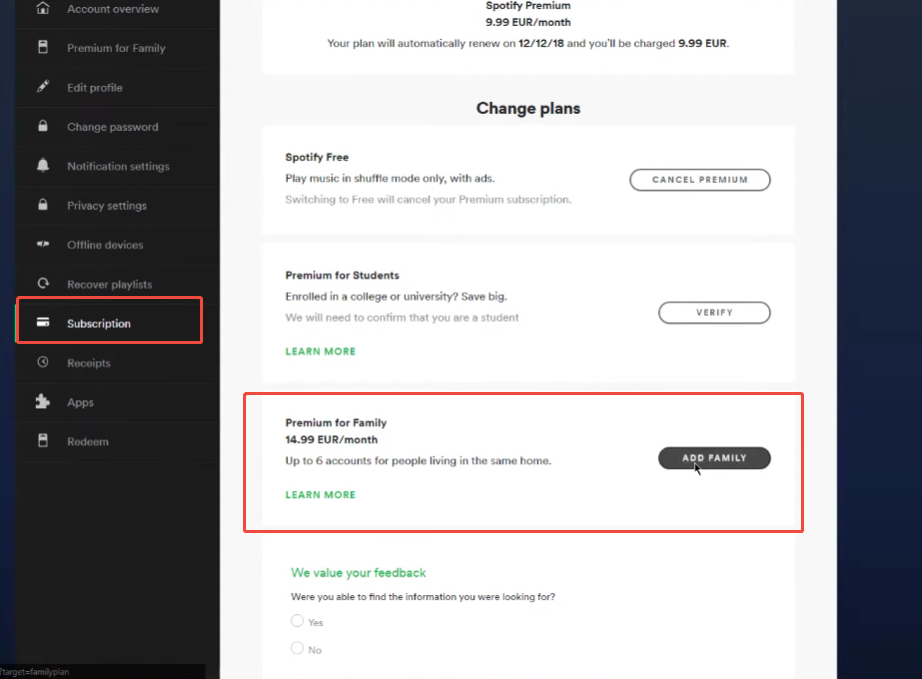
2. Open Your Subscription Settings
Go to your account section and find your current subscription details.
You should see your current Individual Premium plan there.
3. Select “Change Plan”
Look for the option to change or manage your subscription.
Spotify usually shows available plans like:
- Individual
- Duo
- Family
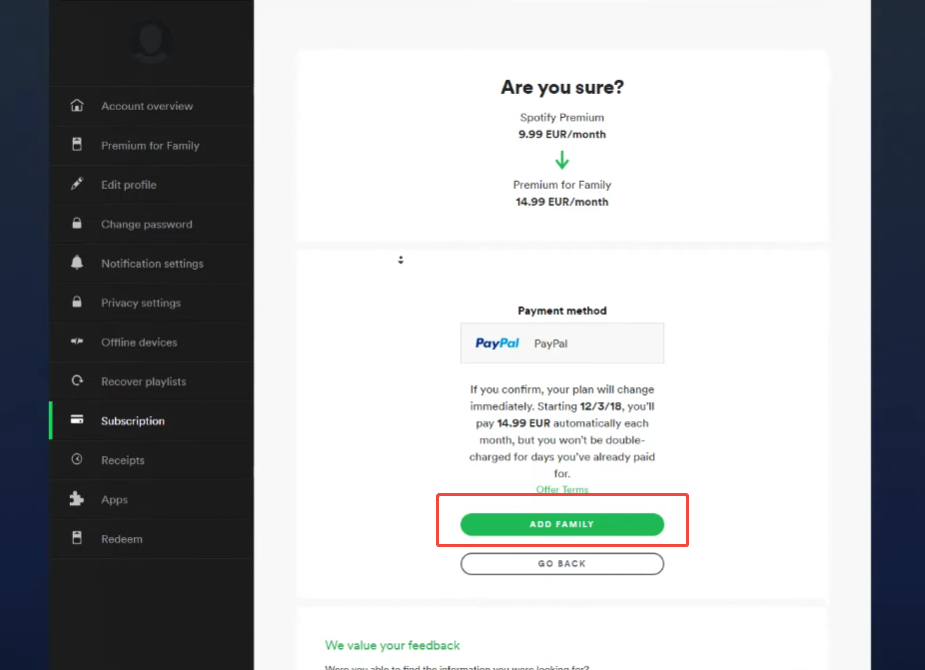
4. Choose Family Plan
Select the “Premium Family Plan” and confirm your payment information.
Once confirmed, your subscription will be upgraded to a family plan. Normally, the changes will take effect on your next billing date.
5. Invite Family Members
After the upgrade, you can send invites to people living at the same address.
Each person accepts the invite using their own Spotify account.
What Happens to Your Music?
One of the biggest concerns for users when changing Spotify plans is whether their music will be lost. The good news is that in most cases, your account content will remain unchanged after the plan is changed. If you are moving to a Spotify plan family, your playlists, liked songs, saved albums, and listening history usually stay connected to your account, so you can continue enjoying your music without starting over.
When you upgrade from a Spotify Individual plan to a Family plan, your Individual account will not be replaced. Your playlists, favorite songs, saved albums, followed artists, and listening history will all be saved.
Spotify also noted that playlists, saved music, and settings will be retained when users switch to a premium plan.
Your music recommendations will also remain linked to your account. This means your daily picks, recommended songs, and other personalized playlists will continue to be updated based on your listening habits.
If you download songs for offline listening, account updates may take some time, but your music library is usually kept linked to your profile.
Common Issues During the Switch
Sometimes users run into small problems.
Payment Not Updating
This may happen if your current subscription is connected to another service, such as mobile billing.
In this case, you may need to cancel the current plan first.
Family Member Cannot Join
Spotify may ask members to confirm the same home address before joining the Family plan.
Plan Not Showing
Sometimes logging out and signing in again helps refresh account options.
Tips Before You Upgrade
Taking a few minutes to prepare before changing your Spotify plan can make the whole process much smoother. Planning ahead can help you avoid problems with setup later.
Check your current payment method. Some users pay for Spotify directly, while others may pay through mobile carriers, network service providers, or other service providers. If your current plan is linked to a third-party service provider, you may need to cancel or change the subscription first.
Please ensure your payment information is up-to-date. Check if your bank card or payment method is still valid. This helps avoid payment errors during the upgrade process.
Verifying your account information is also important. Please ensure your email address, password, and account information are correct, as you may need this information later when managing your family plan.
If you plan to invite other people, ask them to prepare their own Spotify accounts in advance. This will make it easier for them to accept the invitation and successfully join the package.
Another helpful step is to view your playlists and saved music. Your music library will usually remain the same after you change your plan, but checking all the content beforehand can give you more peace of mind.
Finally, please double-check your home address information. Spotify Family plans are designed for family members living in the same residence, so having the correct address ready will help you complete the setup process faster and more smoothly.
Managing Your Family Plan Later
After switching, the plan manager can:
- Add or remove members
- Resend invite links
- Update payment information
- Manage plan settings
This makes it easy to adjust your plan as needed.
Final Thoughts
Upgrading from a Spotify Individual plan to a Family plan is usually very quick and won’t affect your music library. If you live with family members who also use Spotify, upgrading your plan can make your listening experience more convenient and organized.
After the upgrade is complete, everyone can enjoy their own playlists, recommended songs, and advanced features under the same package.


