
Finding a specific playlist on Spotify can sometimes be harder than you think. You might remember part of the playlist name, its creator, or the genre of music it contains, but if you search the wrong way, it’s hard to find the right results. To find a Spotify playlist more easily, you need to use the right search methods, such as entering accurate keywords, checking playlist creators, and using Spotify’s filters to narrow down the results. These simple steps can help you quickly locate the playlist you want without spending too much time scrolling through unrelated options.
Spotify has millions of playlists created by users, artists, brands, and Spotify itself. Because the content is so vast, a simple keyword search may produce too many irrelevant results. A better approach is to search by playlist name, creator, or other relevant information.
The methods to download Spotify playlists as MP3s were explained in the previous blog. This guide will introduce different ways to find Spotify playlists, including how to search by name and creator, how to use filters, and what to do when a playlist doesn’t appear immediately.
How do you find a playlist on Spotify
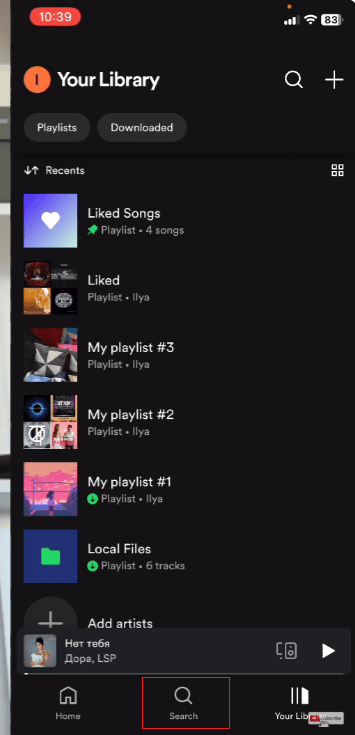
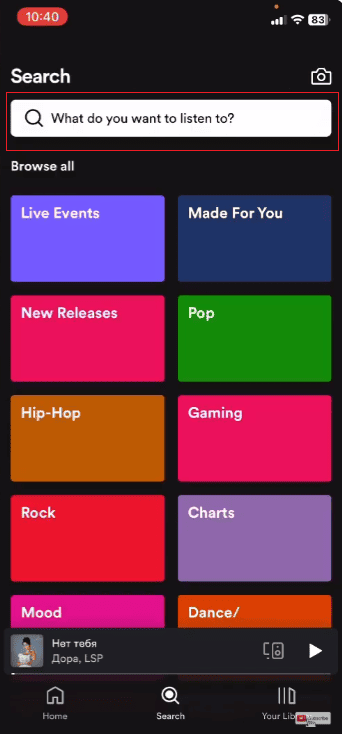
The easiest way to find playlists on Spotify is to use the in-app search function. You can search by playlist name, creator name, or keywords related to music genre.
Follow these steps:
- Open Spotify on your phone or computer.
- Tap the search bar at the top of the screen.
- Enter the playlist name or a related keyword.
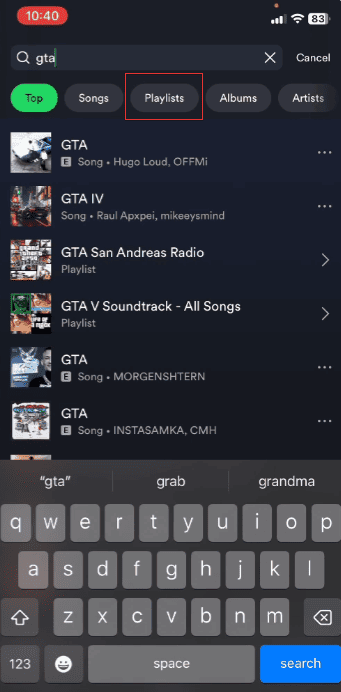
- Select the Playlist category from the search results.
- Check the playlist cover, creator name, and song list to find the correct one.
For example, if you are looking for a playlist called “Summer Road Trip”, searching for the full name will quickly find matching playlists. If you only remember “summer” or “road trip”, you may need to look at multiple results.
Using more specific keywords usually yields better results. Adding words like “workout,” “study,” “party,” or “relax” can help narrow down your search.
Search for a Spotify playlist by name
On Spotify, searching by playlist name is one of the easiest ways to find playlists. If you know the exact playlist name, you can enter it directly into the search bar and then look for it in the “Playlists” section of the search results.
However, many playlists have similar names, which can make it difficult to find the playlist you need. For example, searching for “workout music” or “relaxing songs” might show many different playlists.
To get more accurate results, try adding extra details, such as:
- The creator’s name
- A unique word from the playlist title
- A specific artist or music style
For example, instead of just searching for “summer”, try searching for “Alex’s Summer Playlist” or “Summer Pop Songs”. Using more specific keywords can help Spotify Premium apk display the playlists you want faster.
Find a Spotify playlist by creator
If you know who created the playlist, searching by creator is usually faster than searching by name.
Many Spotify users create multiple playlists, so finding their profiles first can help you find the playlist you want.
To search by creator:
- Open Spotify Search.
- Type the creator’s username or display name.
- Open the user profile.
- Browse their public playlists.
- Select the playlist you need.
This method is very effective when the playlist name is common or you can’t remember the exact name.
For example, if someone shared a playlist with you before, but you’ve forgotten its name, searching their Spotify profile is probably the easiest way to find it.
Use Spotify search filters to narrow results
Spotify searches can return a large number of results, especially when searching for frequently used terms. For example, keywords such as “popular,” “relaxing,” or “fitness” may simultaneously display songs, albums, artists, and playlists. Using search filters can help you eliminate irrelevant results and find the playlists you need faster.
After entering keywords in the Spotify search bar, you can choose different result categories, including:
- Playlists– Shows playlists related to your search terms.
- Artists– Displays artist profiles that match your search.
- Albums– Finds albums connected to the keyword.
- Songs– Shows individual tracks.
When your goal is to find a playlist, selecting the “Playlists” section is one of the most useful steps. It can save you time from wasting time browsing songs or albums that are irrelevant to what you need.
You can also combine filters with more detailed search terms. Instead of searching for a single broad term, add more information to get more precise search results.
For example:
- “2000s pop playlist”
- “study music playlist”
- “rock playlist by John”
- “coffee shop jazz playlist”
Adding details such as music style, mood, era, or artist name helps Spotify match more relevant playlists based on your search.
Using Spotify’s search filters and combining them with specific keywords is often much faster than browsing regular search results. It allows you to focus on the type of content you want, making it easier when finding a playlist on Spotify. You can narrow down results by entering details such as the playlist name, creator, music style, or related terms, which helps you quickly discover more accurate matches instead of scrolling through unrelated options.
Find a playlist through a Spotify link
If someone shares a Spotify playlist link with you, opening the link is the fastest way to access it.
Playlist links are commonly shared through:
- Social media posts
- Messages
- Websites
- Blogs
- Online communities
After opening the link, Spotify will take you directly to the playlist page. You can save it to your music library for easy access later.
If you frequently listen to a particular playlist, saving it is very useful because you won’t need to search for it again.
Search for playlists from a Spotify user profile
Spotify profiles are another effective way to discover playlists. Many users create public playlists and display them in their profiles.
To find playlists from a profile:
- Search for the user.
- Open their profile page.
- Look through their public playlists.
- Select the playlist you want.
This is especially useful when you follow friends, music creators, or people who frequently share playlists.
What to do if a Spotify playlist does not appear
Sometimes, playlists may not appear in search results. This could be because the search keywords are too broad, or the playlist information doesn’t match what you remember.
Try these methods:
1. Check the spelling
Even a small spelling mistake can cause you to not find the correct playlist. Try different spellings of the name, or remove special characters.
2. Search fewer words
If you only remember part of the playlist name, search for the most unique word within it, rather than the full title.
3. Search using the creator name
If the playlist title is common, the creator’s name can help you find the right result faster.
4. Check your saved playlists
If you previously followed or saved this playlist, check out your Spotify library. Saving a playlist is more convenient and faster than searching again.
Tips for finding playlists faster on Spotify
A few simple habits can make playlist searches easier:
1. Save playlists you enjoy
Once you find a playlist you like, save it immediately. This will prevent it from being lost in the future.
2. Follow playlist creators
Following creators makes it easier to discover their new playlists and updates.
3. Remember unique details
Instead of remembering only general words like “music” or “songs,” remember special details such as:
- A unique word in the title
- The creator name
- The main artist
- The playlist theme
These details can make future searches much faster.
Final Words
Finding Spotify playlists isn’t difficult. If a simple search doesn’t find the playlist you want, try searching by name, creator, or relevant keywords.
Browsing playlist categories, viewing user profiles, and using specific search terms can all help you find playlists faster. If you are wondering how do I find a playlist on Spotify, the easiest way is to combine different search methods, such as entering playlist names, creator names, or related keywords in the search bar. Whether you’re looking to find your friends’ playlists or discover new music collections, understanding Spotify’s search mechanism can make the whole process much easier.


