
Falling asleep to soft music, calming podcasts, or gentle white noise is a nightly routine for millions of Spotify users. But far too many people wake up to a dead phone battery, jolted awake by a loud chorus in the middle of the night, or confused by hours of unplanned playback. If you’ve been searching for a reliable timer to sleep without extra apps or complicated setups, the built-in spotify sleep timer is one of the platform’s most underrated, game-changing features.
In this guide, we’ll walk you through exactly how to set a timer for spotify on every device, how to pair it with a curated spotify sleep playlist for maximum relaxation, and why every nightly listener should start using this feature tonight.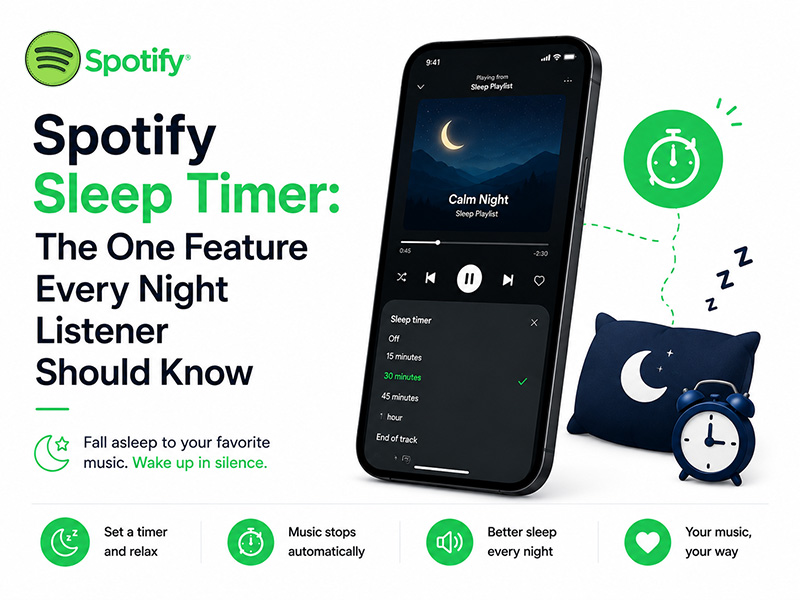
What Is the Spotify Sleep Timer & Why It Matters
At its core, the spotify sleep timer is a simple, built-in tool that automatically pauses playback after a set amount of time. Instead of leaving music running all night, you choose a window that matches how long it takes you to fall asleep, and Spotify fades audio to a stop once the clock runs out.
This small feature delivers big benefits for nightly listeners:
- Protects sleep quality: No more waking up mid-cycle to unexpected loud tracks or podcast transitions
- Saves device battery: Avoids draining your phone or speaker battery with hours of unnecessary overnight playback
- Supports gentle routines: The soft fade-out prevents abrupt stops that can jolt light sleepers awake
- Works for all content: Compatible with songs, podcasts, audiobooks, white noise, and any spotify sleep playlist you love
How to Set a Timer for Spotify
The spotify sleep timer is easiest to use on mobile, where most people do their nightly listening. Below are clear steps for every major platform.
1. On Mobile (iOS & Android)
This is the most common way to use the sleep timer, and it works for both free and Premium accounts:
- Open Spotify and start playing your chosen content — whether it’s a single track, a podcast, or your go-to spotify sleep playlist.
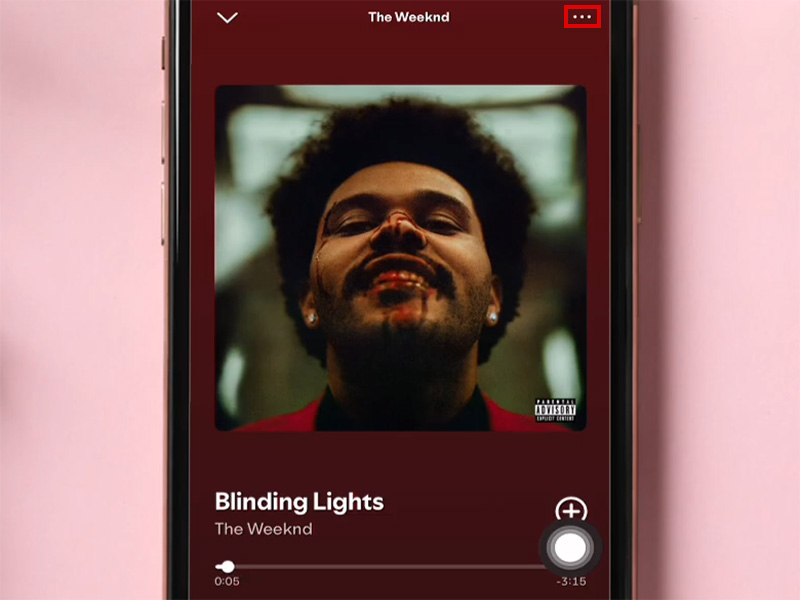
- Tap the Now Playing bar at the bottom of the screen to open the full player view.
- Tap the three-dot menu icon in the top-right corner.
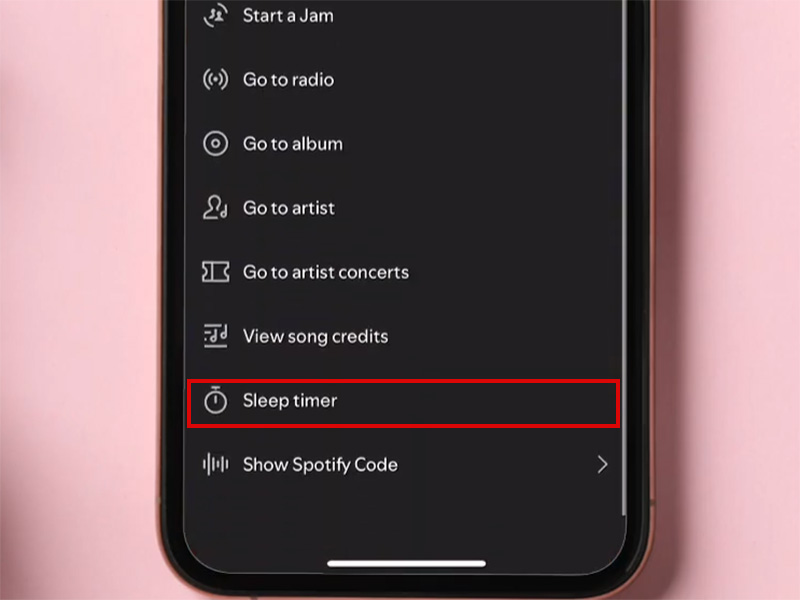
- Scroll down the menu and select Sleep Timer.
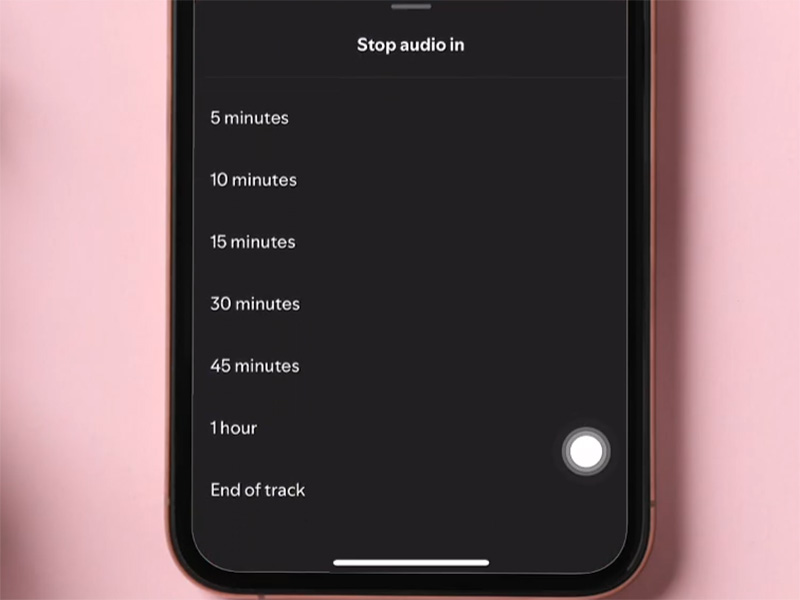
- Choose your preferred duration: 5, 10, 15, 30, 45, or 60 minutes, or the option to stop playback when the current track ends.
- A confirmation pop-up will appear to show your timer is active.
To cancel the timer early, just repeat the steps and select Turn Off Sleep Timer.
1. On Desktop (Windows & Mac)
The desktop Spotify app does not have a native sleep timer button, but you can still get the same functionality:
- Use your computer’s built-in system sleep timer to shut down audio after a set window
- Use Spotify Connect to control playback from your mobile device, and set a timer for spotify through your phone even when audio plays on desktop
Elevate Your Nightly Routine With a Spotify Sleep Playlist
A timer to sleep works best when paired with the right audio. A well-curated spotify sleep playlist sets a calm pace, lowers your heart rate, and helps you drift off faster. And the timer ensures it doesn’t overstay its welcome.
How to Pick the Perfect Sleep Playlist
- Try official curated playlists first: Spotify’s in-house teams have built dozens of sleep-focused collections, including Deep Sleep, Sleep Piano, and White Noise for Sleeping. These are professionally sequenced to stay calm and consistent all the way through.
- Build your own for a personal fit: If you make a custom spotify sleep playlist, stick to tracks with 60–80 BPM to match a resting heart rate. Avoid songs with sudden loud sections, heavy bass, or energetic choruses.
- Add natural sounds: Rain, forest ambience, and soft ocean waves pair wonderfully with gentle music and make the fade-out feel even more natural.
Pro tip: Set your timer to run 10–15 minutes longer than your average time to fall asleep. This gives you buffer room to relax fully, without leaving music playing for hours after you’re asleep.
Pro Tips to Get the Most Out of Your Spotify Sleep Timer
Once you know how to set a timer for spotify, these small tweaks will make your nightly routine even smoother:
- Download your sleep playlist offline: Save your go-to spotify sleep playlist to your device so you can use airplane mode while you sleep. This saves battery and reduces overnight screen and signal exposure.If you’re unsure how to download full playlists to your phone for offline bedtime listening, check out our complete walkthrough: How to Save Songs on Spotify for Offline Listening.
- Use it for podcasts and audiobooks too: The spotify sleep timer works for every type of audio, not just music. It’s perfect for long true-crime podcasts or chapter books you never finish before dozing off.
- It works with external speakers and headphones: The timer syncs across Bluetooth speakers, wireless headphones, and any device connected via Spotify Connect. You don’t have to adjust settings on your speaker itself.
- Stick to consistent timings: Using the same timer length every night helps train your body to wind down on schedule, building a healthier sleep routine over time.
Common FAQs About the Spotify Sleep Timer
- Do free Spotify users get the sleep timer?
Yes. The spotify sleep timer is available to all users, both free and Premium. You do not need a paid subscription to use this feature.
- Will the timer work with offline downloaded music?
Absolutely. The timer controls playback regardless of whether you’re streaming online or listening to downloaded tracks from your spotify sleep playlist.
- Can I set a timer for Spotify on smart speakers?
Yes. If you’re playing Spotify through a smart speaker via Spotify Connect, just set the sleep timer on your phone, and it will apply to the speaker playback automatically.
- What happens if I fall asleep before the timer ends?
That’s exactly the point. The music will fade out gently when the clock runs out, with no action needed from you. You can sleep through the entire process without interruption.
Final Thoughts
For anyone who regularly listens to music, podcasts, or white noise before bed, the spotify sleep timer is a tiny feature that makes a huge difference. It requires no extra downloads, no paid upgrade, and just a few taps to set up. When paired with a thoughtful spotify sleep playlist, it turns casual nightly listening into a deliberate, rest-supporting routine.
If you’ve been looking for a simple, hassle-free timer to sleep, stop searching for third-party apps. Just open Spotify, set a timer for spotify tonight, and notice how much more rested you feel in the morning.


