
Tired of Spotify’s default green and dark interface? Want to give your music app a fresh, vibrant look with a spotify pink theme? While official Spotify offers limited spotify ui customization options, this 2026 guide explores all methods to transform your app’s appearance. It covers from native tricks to advanced tools and our optimized spotify premium mod apk 2026 with built-in pink themes and full spotify apk customization capabilities.
Understanding Spotify‘s Native Customization Limitations
Let’s start with the facts: Spotify does not offer a built-in setting to directly change its primary color to pink. The app’s interface design is tightly controlled by Spotify’s branding guidelines, limiting official customization to:
- Light/Dark Mode Toggle: Switch between dark and light interface palettes
- Dynamic Accent Colors: The Now Playing screen automatically adopts colors from album artwork
- Playlist/Profile Visuals: Custom playlist covers and profile pictures that influence small UI elements
While official options are limited, creative workarounds and third-party solutions let you achieve a full spotify pink theme. And our spotify premium apk latest version makes it easier than ever.
How to Get Pink on Spotify: Official Workarounds
Before exploring advanced methods, try these native-compatible tricks to add pink elements to your Spotify experience:
1. Leverage Dynamic Color Accents
Spotify’s Now Playing screen uses album art to generate matching accent colors. To get pink highlights:
- Create a playlist with songs featuring pink album covers
- Play the playlist. Spotify will automatically apply pink accents to the player interface
- For stronger pink presence, choose albums with bright, saturated pink artwork
2. Use Device Accessibility Features
System-level accessibility tools can invert or filter colors to create a pink effect:
Android:
- Go to Settings > Accessibility > Color inversion
- Enable Color inversion and set the intensity to your preference
- For targeted effect: Use “App-specific settings” to apply inversion only to Spotify
iOS:
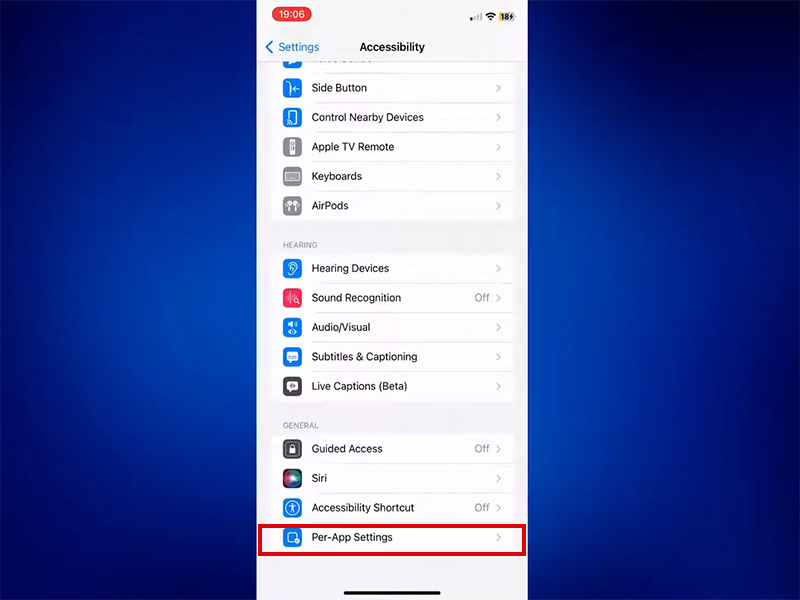
- Open Settings > Accessibility > Pre-App Settings
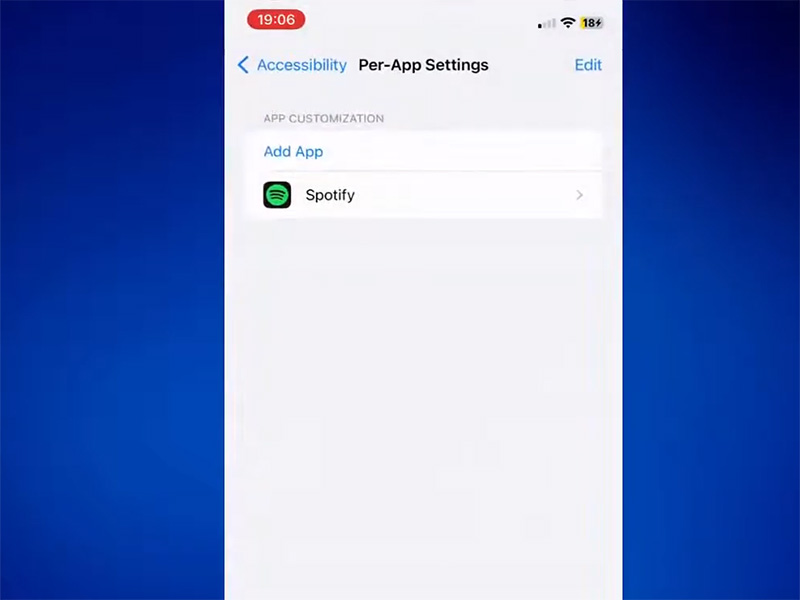
- Tap Add App and select Spotify
- Select Smart Invertand tun it on
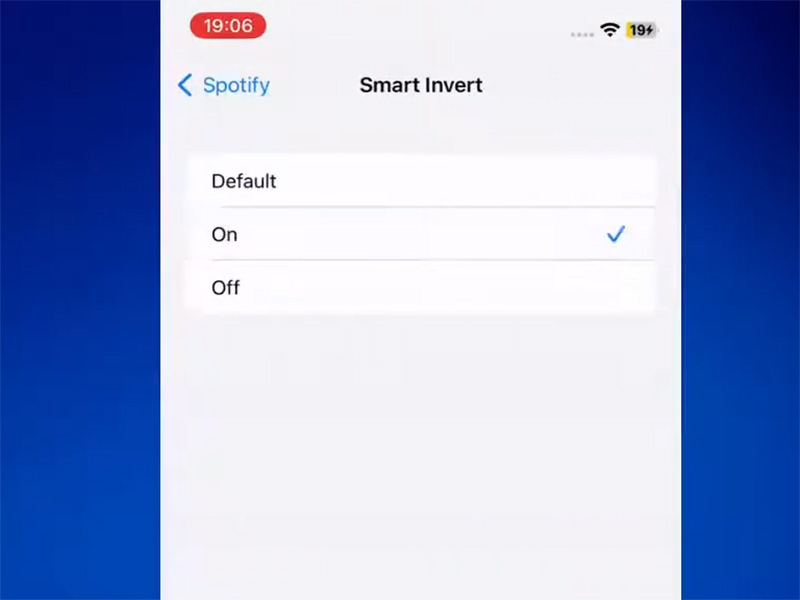
Note: This method affects the entire app and may invert album art colors—best for users wanting a system-wide pink aesthetic.
Advanced Spotify UI Customization for Pink Themes
For a true, non-inverted spotify pink theme, advanced tools offer deeper customization:
1. Spicetify
Spicetify is a powerful open-source tool that modifies Spotify’s desktop client to enable full spotify ui customization:
- Install Spicetify via command line
- Open the Spicetify Marketplace
- Search for “pink” themes
- Install your favorite pink theme and apply changes
- Restart Spotify to see the new pink interface
Pros: Complete UI control, community-created themes, no system color inversion
Cons: Requires technical setup, may break with Spotify updates, desktop-only
2. Browser Extensions
For Spotify Web Player users, extensions like Stylus inject custom CSS to create spotify pink theme options:
- Install Stylus extension for Chrome/Firefox/Edge
- Search “Spotify pink theme” in the Stylus library
- Install a high-rated pink theme
- Open spotify’s official websiteto see the pink interface
Pros: No app modification, easy to toggle on/off
Cons: Only works on web player, limited to browser sessions
Why Spotify Premium Mod APK 2026 Elevates Customization
Official Spotify Premium doesn’t unlock additional color customization, but our spotify premium apk latest version offer game-changing spotify apk customization features—including pre-built pink themes and full UI control:
1. Core Advantages of Our Spotify Premium Mod APK
- Built-in Pink Themes: Choose from multiple spotify pink theme options without external tools
- Full UI Customization: Adjust accent colors, backgrounds, and button styles directly in the app settings
- No Technical Setup: Install the APK and start using pink themes in minutes
- Premium Unlocked: Enjoy ad-free listening, unlimited skips, offline downloads, and high-quality audio alongside customization
- Regular Updates: Our spotify premium apk latest version stays compatible with official Spotify updates to avoid breakage
2. Objective Look at Risks & Benefits
| Aspect | Official Spotify | Spotify Premium Mod APK 2026 |
| Customization | Limited to light/dark mode | Full spotify ui customization with pink themes |
| Cost | $12.99/month(The price may vary due to promotions and regions. Please check the latest pricing on the official website.) | Free |
| Account Safety | 100% safe | Moderate risk |
| Ease of Use | Basic, no setup | Simple installation, pre-configured themes |
| Stability | Always stable | Updated weekly for compatibility |
Critical Note: Third-party mod APKs carry inherent risks. Our platform provides virus-free, scanned files and recommends using a secondary account to protect your main profile.
3. How to Install Our Spotify Premium APK Latest Version
- Download spotify premium mod apk 2026 from our website.
- Enable “Unknown Sources” in Android settings
- Install the APK and log in with your Spotify account
- Open Settings > Customization to select your favorite spotify pink theme
- Enjoy a fully pink interface with all Premium features unlocked!
Tips for Perfect Spotify Pink Theme Experience
- Match Playlist Art: Use pink-themed playlist covers to complement your new UI
- Adjust Brightness: Pink interfaces can be bright; lower screen brightness for eye comfort
- Combine Methods: Use dynamic accents + mod APK for layered pink effects
- Update Regularly: Keep your spotify premium apk latest version updated to maintain theme compatibility
- Backup Playlists: Always backup playlists before installing any modified app
Final Thoughts
While official Spotify limits spotify ui customization, multiple methods let you enjoy a spotify pink theme. For the easiest, most comprehensive solution, our spotify premium mod apk 2026 delivers pre-built pink themes, full customization, and all Premium features without subscription costs.
Evaluate your technical comfort and account safety preferences to choose the best method. Ready to trade green for pink? Download our spotify premium apk latest version today and transform your music experience!


