
Spotify Premium Student Plan is a discounted subscription program designed for students currently enrolled in eligible schools or universities. Often referred to as Spotify Premium Students, it offers the full Premium features at a lower price, but requires periodic verification to confirm you are still a student.
Unlike the ways to get Spotify Premium on iPhone. This guide will explain the verification process, the information you need to provide, and how to ensure your discount remains valid.
What the Student Plan Includes
Spotify Premium Student Plan offers eligible students the same core experience as regular Premium members, but for a lower monthly fee, and it also makes it easy to enjoy bundled entertainment options such as hulu with spotify student without changing the overall listening experience. Although the price has decreased, most of the main functions remain fully available, making it an ideal choice for everyday listening to music, studying, and entertainment.
Here is a clearer breakdown of what you get:
1. Ad-Free Music Listening
One of its main advantages is uninterrupted playback. You can listen to songs, playlists, and albums without having to endure any audio or video ads. This helps you stay focused, especially while studying or commuting.
2. Offline Downloads
You can download music and podcasts to your device and listen to them without an internet connection. This is very useful when traveling, in areas with weak signal, or when you want to save mobile data.
3. Unlimited Skips
Unlike the free version, the student version allows you to skip songs at will. This gives you more control over what you want to listen to and helps you quickly find songs that match your mood.
4. High-Quality Audio Streaming
You get better sound quality settings compared to free users. This difference becomes even more apparent when using high-quality headphones or speakers, especially when enjoying music that is rich in detail or layered.
5. Full Access Across Devices
The subscription service is available on a variety of devices, including mobile phones, tablets, laptops, and desktop computers. Your playlists and listening history will stay in sync, so you won’t lose your listening progress when switching devices.
6. Spotify App Features
You still get access to standard Spotify features such as:
- Personalized playlists like Discover Weekly
- Daily mixes based on your taste
- Search and play any track on demand
- Podcast streaming with no restrictions
7. Student-Only Pricing
The main difference lies in the lower monthly fee, which is far lower than that of a regular premium plan. This makes it more suitable for students who want to enjoy all the features but don’t want to pay the standard price.
Who Can Apply for the Student Plan
The Spotify Premium student program is not open to everyone; eligibility depends primarily on your current educational status, and Spotify established these rules to ensure that only students enrolled in accredited institutions can enjoy this benefit, which is also why the spotify premium student plan requires verification before access is granted.
To apply, you typically need to be a student at an accredited higher education institution. In many cases, this includes both full-time and part-time students, provided your school is on Spotify’s verification system.
Your institution must be able to be verified through Spotify’s partner verification service. Most well-known universities and colleges are included, but smaller or less established institutions may not be shown immediately. In this case, you may need to provide additional proof of enrollment.
In summary, the main requirement is simple: you must be a current student at an eligible institution that can be verified through the Spotify system.
How Student Verification Works
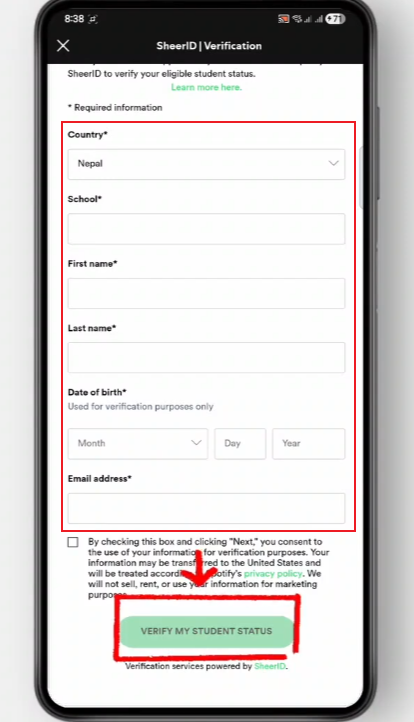
When you sign up for the Spotify Premium Student Program, the verification process is designed to confirm that you are currently enrolled in an eligible school, and if you choose the spotify student plan, this step is necessary to enjoy the discount and usually only takes a few minutes to complete, although the final review may take longer depending on your individual circumstances.
Step 1: Choosing Your School
First, select your school or university from the list of schools or universities supported by Spotify. You need to enter the school name and select the correct match. This step is very important because the system uses this information to check if your school is eligible for student discounts.
If your school appears on the list, you can proceed directly. If this does not occur, the system may request additional confirmation information in subsequent steps.
Step 2: Filling in Personal Details
Next, you will be asked to provide basic personal information. This usually includes:
- Full legal name
- Date of birth
- Country of study
- Email address
In some cases, using a school-provided email address can simplify the verification process, but it is not always necessary. The main purpose of this process is to match your information with official student records.
Step 3: Identity and Enrollment Check
After you enter your information, Spotify will use a verification system provided by a third-party service. The system will check if you are reading.
Depending on your school and region, the system may be able to automatically confirm your enrollment status. If automatic confirmation is not possible, you will be required to provide relevant supporting documents.
Step 4: Uploading Proof (If Needed)
If manual verification is required, you may need to upload one of the following:
- Student ID card with valid dates
- Official enrollment letter from your school
- Class schedule or registration document
The document should clearly show your name, your school name, and a valid enrollment period. Clear images help the process move faster.
Step 5: Review and Approval
After submitting the information and documents, the system will review them. In most cases, the review will be completed quickly, but if additional checks are required, it may take longer.
Once approved, your Spotify account will be automatically switched to the student discount program, allowing you to start using premium features at a discounted price.
Step 6: Periodic Re-Check
Student status is not permanent, so Spotify will ask you to re-verify your eligibility after a period of time. Typically, Spotify will send a simple reminder to let you check your current reading status again.
If you are still a student, you can continue using it without making any changes. Otherwise, your subscription plan will automatically switch back to the standard Premium membership plan.
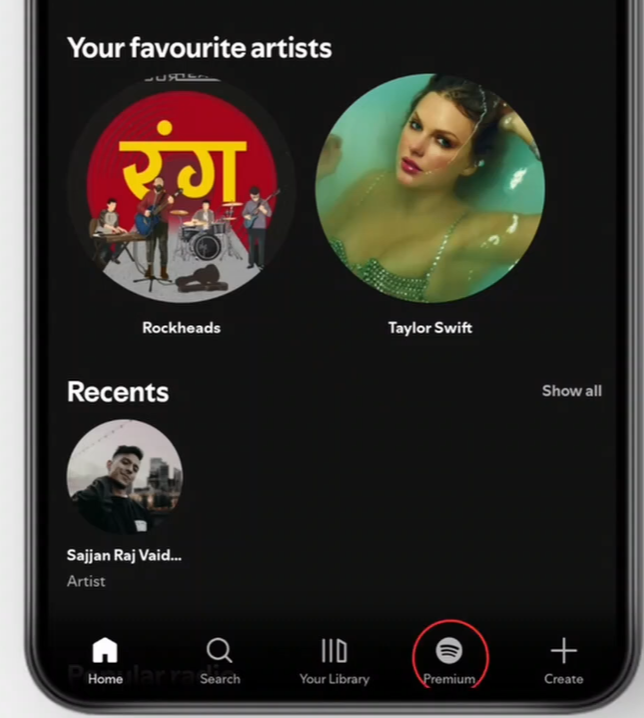
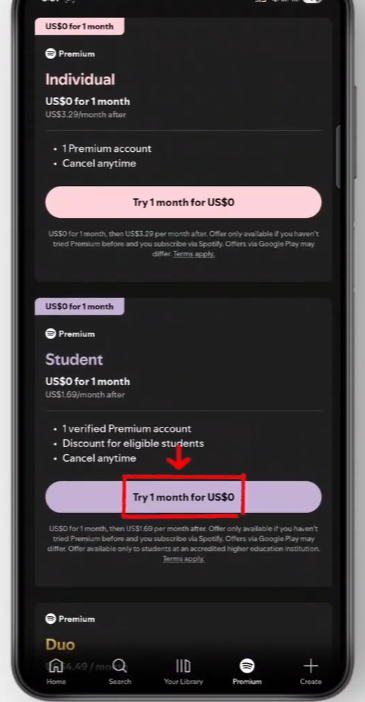
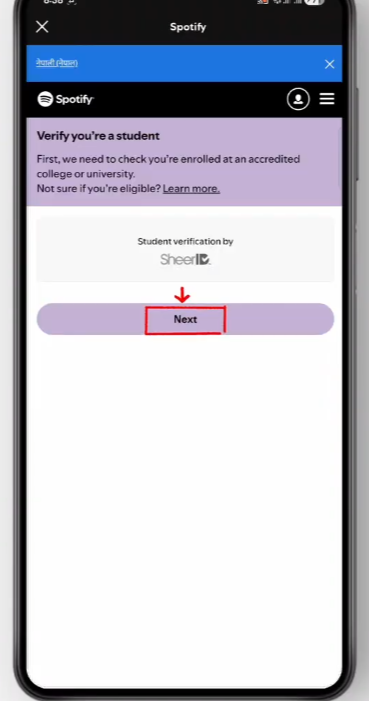
How to Keep Your Student Discount Active
Spotify’s student discount is not permanent, so maintaining eligibility depends on maintaining valid student status and completing the required periodic verifications. The process is simple, but you need to check it regularly.
First, ensure your account information is accurate. Your name, school, and enrollment information must be completely consistent with your current student record. Even minor differences can cause verification delays.
Second, respond promptly to re-verification requests. Spotify may ask you to reconfirm your student status after a period of time. Please complete the verification process as soon as possible to avoid temporarily losing your discount eligibility.
Third, ensure your proof of enrollment is up-to-date. If you change schools, majors, or graduate, your student status may change, so you may need to provide new supporting documentation if you are still within the validity period of your student status.
Finally, using the same email address and login method helps avoid system confusion and makes it easier for Spotify to identify your account during the review process.
In general, as long as you remain a registered student and keep your information updated, the discount will remain valid indefinitely without requiring much effort.
Tips for a Smooth Verification Process
The verification process for Spotify’s student program is generally straightforward, but a few minor details can slow things down or add extra steps. If you are well prepared from the beginning, the whole process will often be smoother and faster.
1. Use consistent personal information
Please ensure that the name you enter matches the school record exactly. Even minor differences such as middle names, spaces, or abbreviations can sometimes affect the verification results. It’s best to keep your Spotify account information consistent with the information on your official student ID.
2. Prefer your school email when available
If your university provides student email addresses, please use that email address when registering. Email addresses with school domains are usually easier for the system to recognize, and in many cases, they can reduce the need for additional document review. If you are using a personal email address, please make sure to carefully verify the accuracy and completeness of all other information.
3. Prepare clear and updated documents
If you are asked to upload proof of enrollment, make sure the document is:
- Recent and not expired
- Fully visible (no cropped edges)
- Easy to read, with clear text and dates
Blurry or incomplete images are one of the most common reasons for delays.
4. Check your school listing carefully
Before submitting, please make sure your institution name is correct in the list. Some institution names may be similar, so please be sure to select the exact matching institution. Choosing the wrong option may result in unnecessary rejection or delays.
5. Avoid rushing the submission
It’s helpful to take the time to carefully check everything before submitting. Quickly checking the name, school, and uploaded files can avoid some unnecessary problems.
6. Keep a stable connection during upload
Please ensure a stable network connection when uploading files. An interrupted upload may result in an incomplete submission, and you may need to restart the upload process.
Final Thoughts
Spotify Premium Student Plan is ideal for students who want to enjoy the full Premium service at a lower price. The key is to ensure that your student information is accurate and to verify it when necessary.
As long as your student status is valid and your personal information is up-to-date, you can usually maintain the discount easily and consistently.


