
Many people start a Spotify Premium trial to enjoy ad-free music, offline listening, and better sound quality. Before the trial turns into a paid plan, it’s important to understand how to use extraordinary cancel Spotify in time to avoid unexpected charges.
This guide will clearly explain the specific steps to cancel your subscription and what will happen after cancellation.
When Should You Cancel the Trial?
Spotify Premium trial periods are usually around one month with full Premium access, so users often compare options like Spotify Premium trial vs Spotify Premium Mod 2026 to understand differences in features, safety, and long-term usability.
The best time to cancel is before the trial period automatically renews. You don’t have to wait until the last day to cancel; in fact, it’s safer to cancel a few days in advance to avoid missing out due to forgetfulness. Even if you cancel your subscription, you can still enjoy all the premium features until the trial period ends.
Some users tend to cancel their subscription immediately after starting a trial. The advantage of doing this is that they can continue to use all the functions fully during the remaining trial period, while completely avoiding the risk of being automatically charged in the future. This method is very effective if you know from the beginning of the trial that you will not continue to subscribe after the trial period ends.
If you are still undecided, you might as well wait and see how often you use the service. If you find yourself rarely using Premium exclusive features such as “offline listening” or “ad-free playback,” then canceling your subscription before the trial period ends is undoubtedly a wise move.
You can cancel at any time before the trial period automatically renews; however, canceling in advance will give you more control and peace of mind.
How to Cancel Spotify Premium Trial
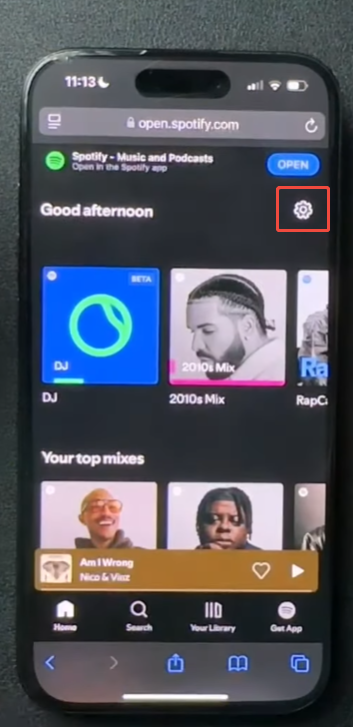
Canceling your Spotify Premium trial is simple, but you need to follow the right steps. It must be done through a browser, not inside the app. Here is a clear step-by-step guide:
Step 1: Open the Spotify website
Go to the official Spotify website using your phone or computer browser. Then log in with the account that started the trial.
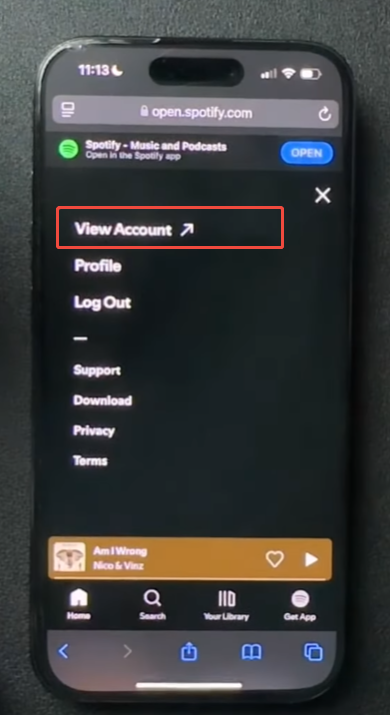
Step 2: Go to your account page
After logging in, click on your profile icon and select Account Overview. This is where your subscription details are shown.
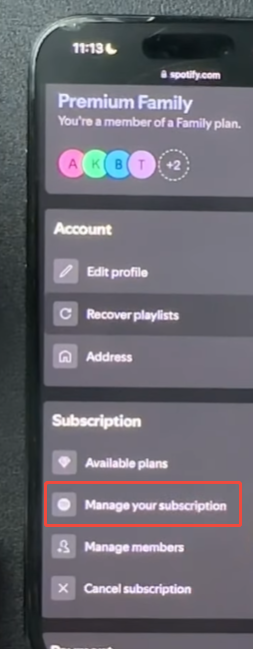
Step 3: Find your Premium plan
Scroll down the page until you see your current Premium subscription or trial plan. This section shows your billing status and next payment date.
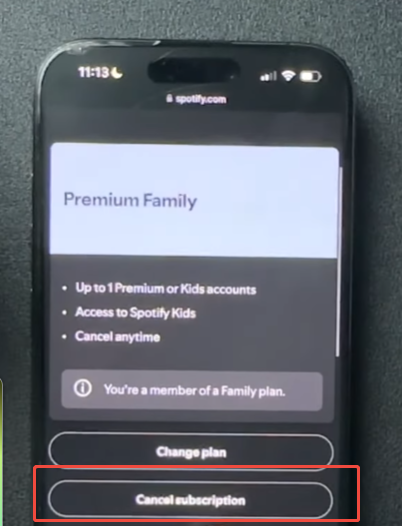
Step 4: Choose “Cancel Premium”
Click on Cancel Premium or Change Plan. Spotify will show a page explaining what happens after cancellation.
Step 5: Confirm cancellation
Follow the instructions on the screen and confirm your choice. Once confirmed, your trial will be scheduled to end at the final trial date.
Step 6: Check your account status
After canceling, you can go back to your account page to make sure the plan is set to end. It will show the exact date when Premium access stops.
What Happens After You Cancel?
Your account will not be immediately invalidated after you cancel your Spotify Premium trial. You can still use Spotify, but your experience will change once the trial period ends.
If you are looking for How to cancel Spotify Premium without logging in, you can still enjoy full Premium benefits during the remaining trial period, including ad-free listening, skips, and offline downloads before the cancellation takes effect.
When the trial period ends, your account will automatically switch back to the free version. At that point, you will once again hear advertisements between songs. In addition, you will lose the offline listening function, so an internet connection will be required to play music.
Your saved music, playlists, and followed artists will remain in your account. You will not lose any personal content. You can still open your music library and play your favorite songs, but some features will be limited.
If you decide to upgrade back to Premium in the future, you can do so at any time through your account settings. All your previously saved content will be intact, so you can pick up where you left off without having to start from scratch.
Common Problems Users Face
Sometimes users get confused during cancellation. Here are a few common situations:
1. Cannot Find Cancel Button
This usually happens when you are using the mobile app. Always use a browser instead.
2. Still Showing Premium
If your trial is still active, Premium features will continue until the end date.
3. Wrong Account Login
Make sure you are logged into the same account used to start the trial.
Tips Before Canceling
Before canceling your Spotify Premium trial, it’s best to check a few details first. Following these steps can help you avoid losing access to features prematurely or missing any important details. If you are also researching alternative clients or discussions around Spotify mods 2026, make sure you understand the risks and limitations before making any changes to your account.
Double-check your trial end date. Spotify will clearly show you when your Premium privileges will expire. Even if you cancel your subscription in advance, your Premium privileges will continue until that end date; however, knowing the exact end date can help avoid any unexpected situations later.
While your Premium access is still valid, please save or download your favorite playlists. During the trial period, you can download songs for offline listening. If you anticipate needing to listen offline in the future, please ensure that all required playlists have been downloaded before the trial period ends.
Review your listening habits. Please review how often you use Spotify Premium exclusive features, such as ad-free music playback or offline mode. This helps you determine whether the service is still useful to you, or whether the free version is sufficient to meet your needs.
Check your device’s storage space and downloaded content. If you have saved a large number of offline songs, please note: once the trial period ends, these songs will no longer support offline playback. You will still be able to listen online, but the offline playback function will no longer be available.
Please make sure you are logged in with the correct account. Some users may have multiple Spotify accounts and may accidentally cancel the wrong account. Therefore, please double-check before proceeding with any action to prevent errors.
Final Thoughts
Canceling your Spotify Premium trial isn’t difficult if you find the right entry point. The key is to do it through the website and not leave it until the last minute. As long as you cancel in time, you will not be charged, and you can continue to enjoy all the features of Premium until the trial period ends. At the same time, some users may come across search terms like best Spotify mod apk 2026 when exploring alternative access options, but it’s always safer and more reliable to stick with official Spotify plans and trial management to avoid unnecessary risks and account issues.
Knowing how to cancel your Spotify Premium trial will help you stay in control of your subscription and avoid unexpected charges.


