
Spotify is more than just a music streaming platform; it’s also a social experience. You can follow friends, share playlists, and even listen together. If you’re wondering how to add a friend on Spotify, this guide will walk you through the different ways to connect with people on the platform.
We’ll also explain related topics like how to add someone to Spotify Family, how do I add someone to my Spotify Duo, and how sharing works across the Spotify Premium app, including updates from Spotify Premium March 2026.
Why Add Friends on Spotify?
Adding friends on Spotify lets you enjoy a more interactive music experience. Once connected, you can:
- See what your friends are listening to
- Share playlists and favorite tracks
- Collaborate on playlists
- Join listening sessions together
This social element makes discovering new music much easier and more fun.
How to Add a Friend on Spotify
Here are the main ways to add friends using the Spotify Premium app or the free version.
Method 1: Follow a Friend by Username
- Open the Spotify app.
- Tap the Search icon.
- Enter your friend’s Spotify username.
- Open their profile.
- Tap Follow.
Once you follow them, their activity may appear in your Friend Activity panel on desktop.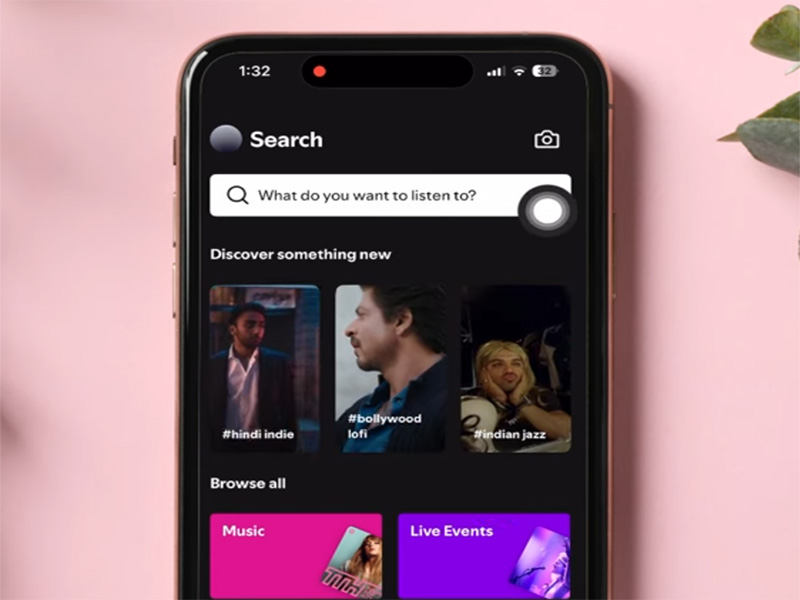
Method 2: Add Friends Using Facebook
Spotify allows you to connect with Facebook to find friends automatically.
Steps:
- Open Settings in Spotify.
- Select Social.
- Connect your Facebook account.
- Spotify will suggest friends who also use the platform.
This is one of the fastest ways to build your friend list.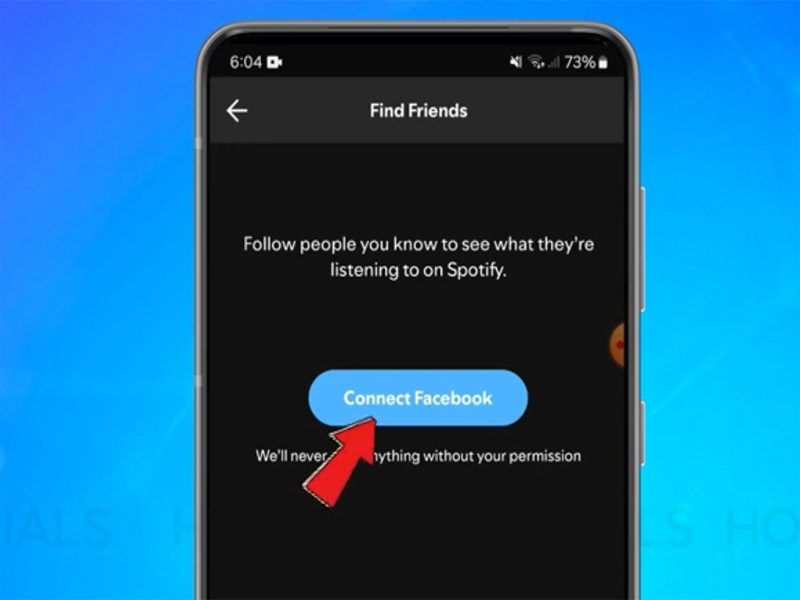
Method 3: Share Profile Links
You can also add friends by sharing profile links.
Steps:
- Go to your Spotify profile.
- Tap Share.
- Send the profile link to your friend.
- They can open it and click Follow.
This method works on any device using the Spotify Premium app.
How to Add Someone to Spotify Family
Many users ask how to add someone to Spotify Family when sharing a subscription.
Spotify Premium Family allows up to six members in the same household.
Steps to Add a Family Member
- Go to your Spotify Account Page.
- Click Premium Family.
- Select Add Member.
- Send the invitation link.
- Your friend or family member accepts the invite and joins the plan.
Spotify may ask members to confirm the same address.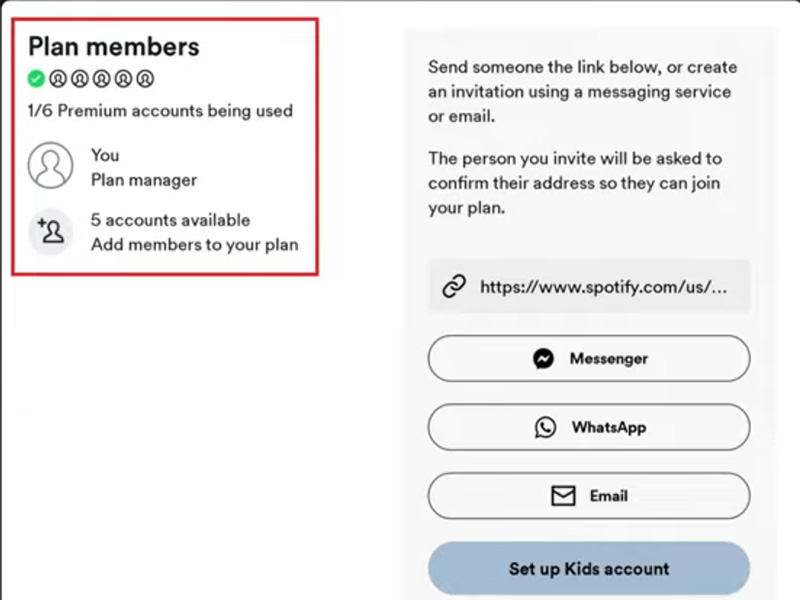
How Do I Add Someone to My Spotify Duo?
Spotify Duo is a premium plan designed for two people (partners, roommates, or close friends) that offers all Premium features at a lower cost than two individual subscriptions. If you’re wondering how do i add someone to my spotify duo, follow these steps:
- Log in to your Spotify account.
- Go to Spotify Duo plan settings.
- Click Invite Member.
- Send the invitation link.
- The second user accepts and joins your Duo plan.
Once they join, both users receive full Premium benefits.
Spotify Premium 2026: March Updates & APK Tips
Spotify Premium March 2026 Updates
The Spotify Premium March 2026 update introduced improvements such as:
- enhanced lyrics display
- improved recommendation algorithms
- faster playlist syncing
- improved collaborative playlists
These features enhance the social aspect of the platform when adding friends.
Adding Friends Using Spotify Premium 2026 APK
Some users install Spotify Premium 2026 APK versions outside official app stores.
In most cases, adding friends works the same way:
- search by username
- follow profiles
- share playlist links
However, certain social features may not work correctly depending on the APK build.
Tips for Connecting with Friends on Spotify
To get the most out of Spotify’s social features:
- Create collaborative playlists
- Share your Spotify profile link
- Enable Friend Activity
- Connect your Facebook account
These tools make it easier to discover music together.
Common Problems When Adding Friends
Can‘t Find a Friend
Double-check the username pay attention to the case-sensitive. Or ask your friend to share their profile link directly. If their profile is private, they’ll need to accept your follow request before you can add them as a friend.
Invitation Link Not Working
Make sure the user logs in before accepting the invite.
Family or Duo Invite Expired
Links for Family and Duo Plans expire after 7 days—send a new invitation if the old one is invalid.
Final Thoughts
Learning how to add a friend on Spotify is simple and opens the door to a more social music experience. Whether you’re following friends, sharing playlists, or inviting someone to a plan, Spotify offers multiple ways to connect.
If you’re managing subscriptions, it’s also helpful to know how to add someone to Spotify Family or how do I add someone to my Spotify Duo so everyone can enjoy the benefits of the Spotify Premium together.


