
Analytics reveal listening habits, track performance, audience behavior, and playlist growth trends that are often hidden beneath the surface. Many Spotify users know about Spotify Wrapped, but few realize that there are multiple ways to analyze playlists throughout the year.
In this guide, we’ll explore five effective ways to check Spotify playlist analytics like a professional and discuss the analytics available to regular users.
Professional Methods for Checking Spotify Playlist Analytics
Method 1: Stats for Spotify
I’ve talked about this tool many times before. It’s an official one, so it gives you accurate, helpful, and very easy daily listening stats. Key Analytics Features:
- Audience Segmentation: Break down your listeners by demographics, location, and listening behavior
- Playlist Performance: Track exactly which playlists are driving streams and discovery
- Release Engagement: Analyze how new releases perform across different listener segments
- Real-time Data: Monitor streaming activity as it happens with minimal delay
Method 2: Use Spotify for Artists
If you’re a musician, Spotify for Artists is one of the most powerful analytics platforms available. It provides detailed information about:
- Streams
- Monthly listeners
- Playlist placements
- Audience demographics
- Listener locations
- Follower growth
- Engagement trends
In 2026, Spotify for Artists launched some important new features. The main one is called “Artist Profile Guard.” This is a tool artists can choose to use, letting them check and approve their songs before they show up on their profile page. It helps tackle the increasing issue of music being wrongly credited or made by computers, which is appearing everywhere on music streaming sites.
Method 3: User-Focused Analytics Tools
If you want to understand your Spotify music better, many tools are now available. They look at your listening habits and give you helpful information.
Stats.fm
This comprehensive tool analyzes your listening history across multiple timeframes—last four weeks, previous six months, and all-time. The update introduced new metrics, including your most active listening days and average song length. Stats.fm has become the go-to for data enthusiasts who want to move beyond Spotify’s native analytics.
Spotify Pie
Created by UCLA undergraduate Darren Huang, Spotify Pie displays listening preferences as a vibrant pie chart. Based on current streams, the tool analyzes your favorite artists and genres and updates monthly.
Icebergify
It accesses Spotify’s data about your top 50 artists and uses it to create a customized iceberg containing your favorite artists, with data ranging from one month to several years.
The Power of Your Spotify DNA
Together, these tools show your unique musical identity – your personal listening style that helps Spotify suggest songs to you.
Method 4: Third-Party Professional Analytics Platforms
While Spotify for Artists provides essential data, third-party platforms offer more advanced analytics, competitive intelligence, and cross-platform insights.
Chartmetric
Chartmetric has established itself as the premium analytics platform, offering comprehensive Spotify dashboard features, including:
- Spotify Overview: Track followers, monthly listeners, playlist reach, and popularity trends through clear visualizations
- Playlist Module: Detailed data on editorial, user-generated, and algorithmic playlists with follower counts and track positions
- Track Journey Visualization: See how songs progress through the playlist ecosystem, identifying organic growth patterns
- Pre/Post-Playlist Analyzer: Measure the impact of playlist additions with before-and-after data
- Competitive Analysis: “Fans Also Like” features and genre benchmarking against peers
Chartmetric’s pricing reflects its premium positioning at 1,400/year or 160/month, making it most suitable for established artists, labels, and serious industry professionals.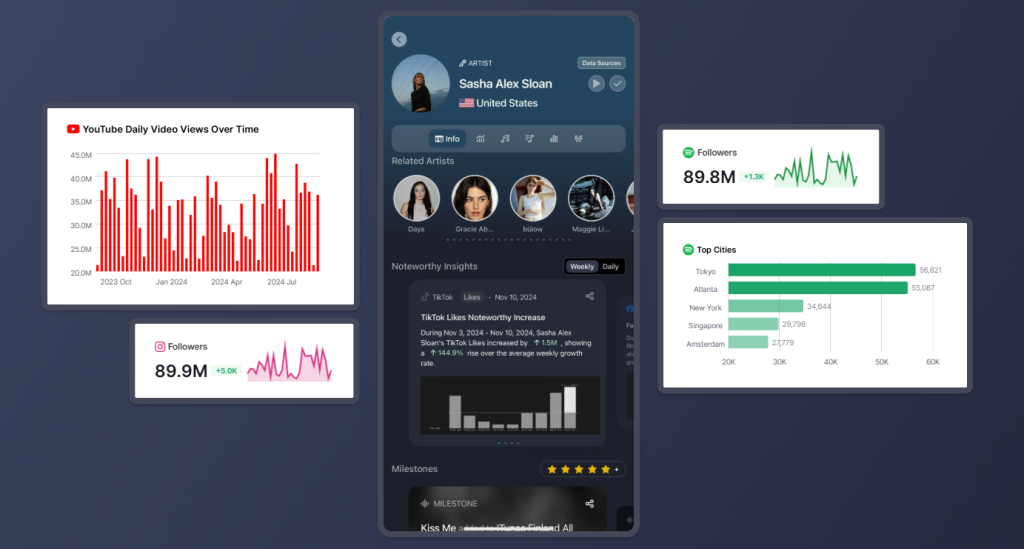
Viberate
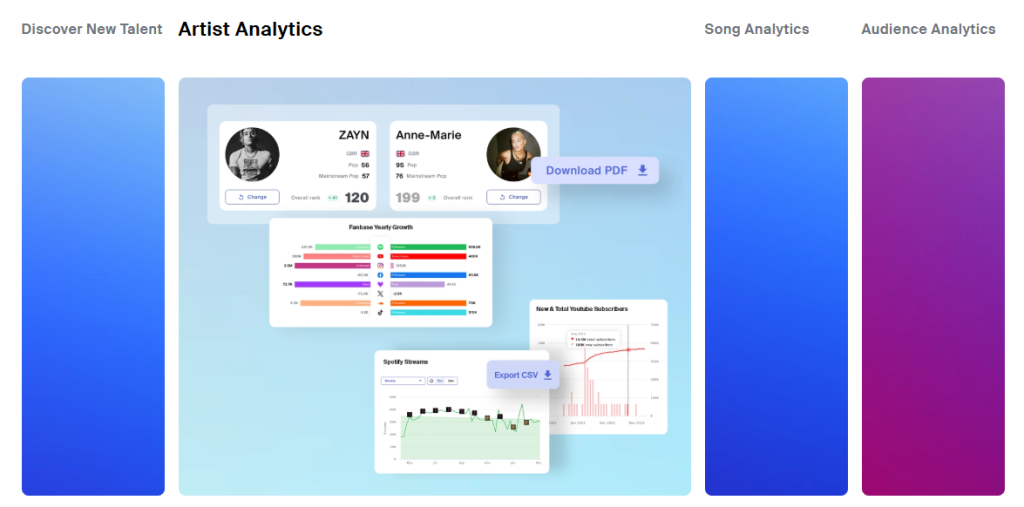
For those needing professional insights without Chartmetric’s price tag, Viberate offers robust analytics starting at €19.90/month. Key features include:
- Career Health Assessment: Benchmark performance against peers with performance gauges and genre rankings
- Stream Tracking: Visual trend graphs marking key events like release dates that cause streaming spikes
- Geographic Analysis: Monthly listener evolution by city and country with growth rate comparisons
- Playlist Recommendations: Algorithmic suggestions based on audience overlaps and genre compatibility
Method 5: Specialized Playlist Analysis Tools
- Chosic: A free Spotify playlist analyzer offering instant breakdowns of genre distributions, mood scores, energy levels, BPM ranges, and overall ratings. It provides visual pie charts for main and sub-genres, tables for top artists and decades, plus metrics like average popularity, danceability, and acousticness—all exportable to CSV for spreadsheet analysis.
- IsItAGoodPlaylist: It’s a program you can use for free with paid options that looks closely at lots of music playlists. It also has a big list of more than 6 million people who create playlists, and an AI assistant to help you write messages to talk to them personally.
Key Metrics: Spotify playlist analytics
It’s now very important to know what information to focus on, since Spotify’s system keeps changing. These are the main things to look at for different kinds of users:
For Artists:
- Save Rate: Tracks achieving save rates above 20% from cold listeners consistently trigger Discover Weekly expansion
- Stream-to-Listener Ratio: Aim for ratios above 2.5, especially within the first 48 hours after release
- Completion Rate: Retention metrics now outweigh raw stream counts in algorithmic ranking
- Discovered On Attribution: The single most important playlist metric, showing which playlists drive genuine discovery
For Listeners:
- Listening Diversity: Measure how many different artists and genres you explore monthly
- Discovery Rate: Track what percentage of your streams are from new-to-you artists
- Mood and Energy Patterns: Use tools like Obscurify to understand your musical preferences
- Time-of-Day Listening: Identify when you’re most engaged with different music types
Final Thoughts
Whether you’re a listener curious about your habits, a playlist curator looking to grow followers, or an artist trying to expand your audience, understanding the data behind your music can provide a significant advantage.
Personally, I believe Spotify for Artists remains the gold standard for musicians, while regular users can gain surprising insights from playlist analysis tools and Spotify’s own listening reports. Of course, if you don’t need this so-called Spotify analytics for users, using the Spotify Premium APK is a better choice, offering free songs and an ad-free experience.


