
Over the past few years, music streaming has undergone tremendous changes, with one of the most notable features being Spotify AI DJ, a built-in function in Spotify that no longer simply plays playlists or radio programs but strives to act like a real DJ, understanding your musical tastes, selecting songs for you, and even interacting with you between tracks.
In the previous article, we shared tips to download Spotify playlists as MP3s. This article will detail how Spotify AI DJ works, how to use it, and the experience you can get from it.
What Is Spotify AI DJ
Spotify AI DJ is a feature of Spotify called Spotify DJ that plays music for you like a private radio DJ. It doesn’t require you to manually select songs or playlists; instead, it creates a continuous playlist for you based on your listening habits, helping you discover music that matches your taste in a more effortless and personalized way.
It will select songs that suit your taste based on the songs you usually play, skip, and like. In addition, it adds short voice comments between songs, making you feel more like you’re listening to a live radio show than a regular playlist.
Simply put, AI DJ is like an automatic music guide. It learns your preferences, continuously plays songs you might like, and also recommends new songs for you from time to time.
How to Access Spotify AI DJ
Using AI DJ is quite simple:
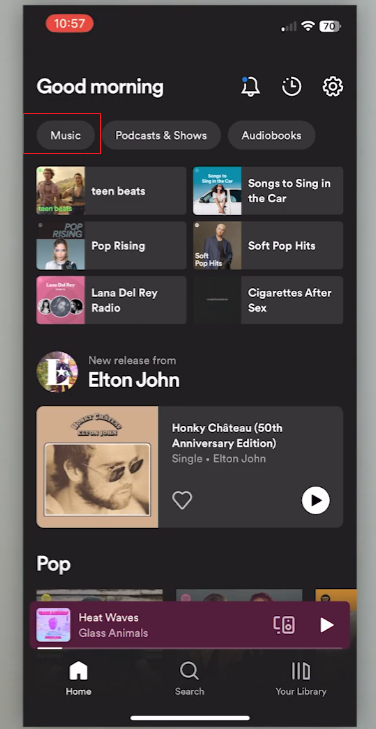
- Open the Spotify app on your phone.
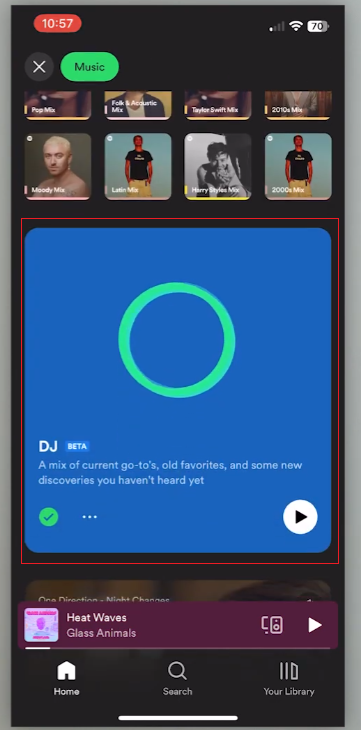
- Go to the “Music Feed” or search for “DJ.”
- Tap the DJ feature when it appears.
- Press play, and the session will start.
Once playback starts, you hardly need to do anything. You can skip songs, but the DJ will continue to select music for you.
This feature learns your past playback habits, so the more you use Spotify, the more accurate your music selection will be.
How Spotify AI DJ Chooses Music
The AI DJ uses several types of data:
- Songs you play often
- Artists you repeat
- Genres you listen to
- Songs you skip
- Time of day you usually listen
It will create a listening pattern based on your preferences and then mix familiar songs with new songs that suit your taste.
For example, if you often listen to indie pop at night, the DJ might start by playing a song you’re familiar with, and then gradually introduce some artists of a similar style that you haven’t heard of before.
This mix of familiar and new songs is one of the core concepts behind the feature.
The Voice Commentary Feature
One of the most notable features of Spotify AI DJ is its voice narration. It appears between selected songs, providing brief voice prompts. Although it is not played continuously, it can be used to guide the listener’s listening experience.
Here are the main things it does:
- Sets the listening mood
The voice may introduce a shift in tone, such as moving from relaxed songs to more energetic ones. - Reflects your listening habits
It can mention patterns based on what you usually play, like favorite genres or artists. - Introduces new music
Sometimes it gives a short hint before playing a song you have not heard before. - Keeps transitions smooth
Instead of sudden changes between songs, the voice helps create a more natural flow.
Overall, the comments are designed to be easy and simple, providing background information without excessively interfering with the music experience.
When Spotify AI DJ Works Best
Spotify’s built-in AI DJ feature isn’t suitable for all listening scenarios, but it can be excellent in certain situations. For example, it can be useful when you want to play background music but don’t want to select songs frequently, and Spotify DJ helps by automatically curating and transitioning tracks so the listening experience stays continuous without much manual control needed.
1. During Work or Study Sessions
AI DJ is very useful when you need to concentrate. It allows music to play continuously without you having to stop what you’re doing to choose the next song.
It can also help you avoid decision fatigue. There’s no need to frequently switch songs or playlists; music plays smoothly in the background, reducing fatigue from long hours of work.
2. While Relaxing or Resting
AI DJs can create a soothing atmosphere when you’re resting or relaxing at home. It will slowly adjust the music according to your listening habits, making you feel natural and calm.
Unlike manually selected playlists, you won’t be trapped in a single atmosphere. If the system detects that you are skipping some fast-paced tracks, it will automatically switch to softer music.
3. For Casual Discovery of New Music
One of the most powerful features of AI DJ is its ability to easily discover new songs. It cleverly blends familiar tracks with lesser-known songs and makes recommendations based on your preferences.
This feature is especially useful when you’re not actively searching for music but still want to listen to something new. Over time, it can also recommend artists or music genres that you might not actively seek out.
4. During Long Listening Sessions
If you listen to music for extended periods, AI DJ can help you avoid repetition. Regular playlists may become repetitive, but DJs will constantly adjust playlists based on your interaction.
It will rotate your favorite old songs, new songs, and songs of similar style, making your long music experience more enriching and interesting.
5. While Doing Repetitive Tasks
AI DJ is very useful for cleaning, commuting, or simple daily activities because you don’t need to operate it. It can automatically maintain the rhythm without you having to worry about it.
In these moments, your goal isn’t deep listening, but rather creating a stable background atmosphere, and an AI DJ is perfectly suited for this role.
6. When You Don’t Know What to Play
Sometimes, the hardest part is choosing songs. AI DJ completely eliminates this step. You just need to start it, and it will automatically generate playlists based on your playback history.
When you’re tired of or confused by your usual playlists, but still want to listen to music that suits your taste, that’s where AI DJ comes in handy.
Difference Between AI DJ and Regular Playlists
| Aspect | AI DJ | Regular Playlists |
| Content Type | Dynamic music stream that changes in real time | Fixed list of songs arranged in a set order |
| How Songs Are Chosen | Based on your listening habits and behavior | Chosen manually by users, editors, or algorithms in advance |
| Personalization Level | High and continuously adapting | Limited to how the playlist was originally created |
| Flexibility | Changes automatically depending on your listening patterns | Stays the same unless edited |
| Music Discovery | Actively introduces new songs and artists | Depends on the playlist creator’s choices |
| User Control | Low direct control, more passive listening | Full control over song order and selection |
| Listening Experience | Feels like a guided radio-style session | Feels like a curated music collection |
| Best Use Case | Background listening, discovery, long sessions | Specific moods, events, or repeatable listening styles |
| Voice / Commentary | Includes optional AI voice transitions | No voice features |
| Consistency | Varies each time you use it | Always predictable unless modified |
Tips to Get Better Results
To make Spotify AI DJs more accurately suit your tastes, developing some simple habits can bring about significant changes. When using the dj in Spotify feature, the system will react to your behavior over time, so even small changes can accumulate into meaningful effects.
1. Actively use likes and dislikes
When you like a song, it means that its style, atmosphere, or singer suits your taste. If a song makes you feel uncomfortable, skipping it can help the system adjust. Doing this frequently is more beneficial than doing it occasionally.
2. Let songs play longer when possible
If the song is played too fast, the system may misjudge your interests. Playing a song for a reasonable amount of time helps the system determine whether you genuinely like this type of music or are only reacting to the beginning.
3. Explore different moods on purpose
If you always listen to the same type of music, the recommendations may become very monotonous. Trying out different musical styles or moods from time to time helps the system gain a more comprehensive understanding of your musical taste.
4. Use AI DJ in different situations
Listening to music in different contexts, such as in the morning, evening, or at work, helps the system better understand your listening habits. Over time, it can adjust music selections based on time and emotional trends.
5. Revisit artists you really enjoy
Playing an entire album or revisiting your favorite artists’ work clearly reveals your core preferences. This helps the AI DJ understand your musical taste and build a smoother transition based on that.
By naturally integrating these habits into your listening process, the AI DJ will gradually become more aligned with your taste and, over time, bring you a smoother music experience.
Final Thoughts
Spotify AI DJ is a simple yet fun advancement in today’s music streaming services. Users don’t need to manually create playlists; the system can guide them through listening while still allowing them to control the playback as needed. With features inside Spotify, it learns your taste and blends tracks in a more personalized way, making discovery feel more natural and less repetitive, especially when using AI DJ Spotify during daily listening sessions where you just want music to flow without much effort.
Its purpose is not to completely replace playlists, but to provide a more relaxed and flexible way to enjoy music. For users who enjoy easily discovering new songs, this is undoubtedly a natural upgrade to their daily listening experience.
As part of Spotify, this feature continues the platform’s move towards a more personalized and automated music experience.


