
If you’ve upgraded to Spotify Premium, you might wonder if your paid subscription unlocks extra social features — like the ability to view other people’s hidden follower lists. It’s a common question, especially for users who want to connect with friends, discover new music through shared tastes, or manage their own privacy on the platform.
The short answer is no: Spotify Premium does not grant you exclusive access to view someone else’s followers, nor does it unlock any hidden social viewing tools. Follower visibility on Spotify has nothing to do with your subscription tier. It depends entirely on the other user’s privacy settings, and the rules apply equally to free and Premium accounts alike.
Below, we break down exactly how Spotify’s follower system works, walk you through how to follow someone on Spotify, explain how to remove followers on Spotify, and clear up the most common misconceptions about Premium and social privacy.
Can You See Someone Else‘s Followers on Spotify Premium
To start with the facts: there is no Premium-exclusive feature that lets you see hidden follower lists, private account details, or anonymous playlist followers. Spotify treats all user profiles the same when it comes to social visibility, regardless of subscription status.
Here’s what you can see, for both free and Premium accounts:
- Public profiles: By default, regular Spotify user profiles are set to public. On the desktop app or web player, you can click the follower count on anyone’s public profile to view their full list of followers and accounts they follow. On the mobile app, most users only see the total follower count, not the full list of names.
- Private profiles: If a user has set their account to private, their follower list, following list, and listening activity are hidden from everyone. No subscription tier — not even Premium — will let you bypass this privacy setting.
- Artist profiles: For musician and artist pages, you will only ever see the total follower count. Spotify never releases the full list of an artist’s followers to the public, even if you have a Premium subscription.
Do keep in mind this rule only applies to user profile followers. If you want to track how many people have saved your curated music collections, check out our dedicated guide: How To Check My Spotify Playlist Followers to view follower stats for your own spotify playlists.
How to Follow Someone on Spotify
Whether you want to connect with a friend, keep up with your favorite artist, or follow a playlist curator, it’s simple to follow on Spotify. There are three easy methods for how to follow someone on spotify, depending on what information you have about the user.
Method 1: Search by Username
If you’re wondering how do i follow a friend on spotify when I know their username, this is the most straightforward method:
- Open the Spotify app or web player and go to the Search bar.
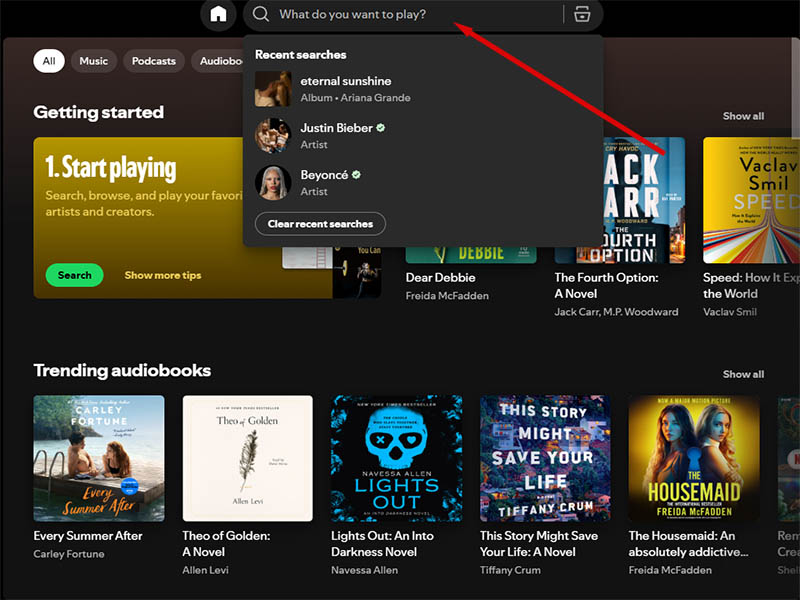
- Type in the person’s exact username or display name.
- Switch to the “Profiles” tab in the search results to find their account.
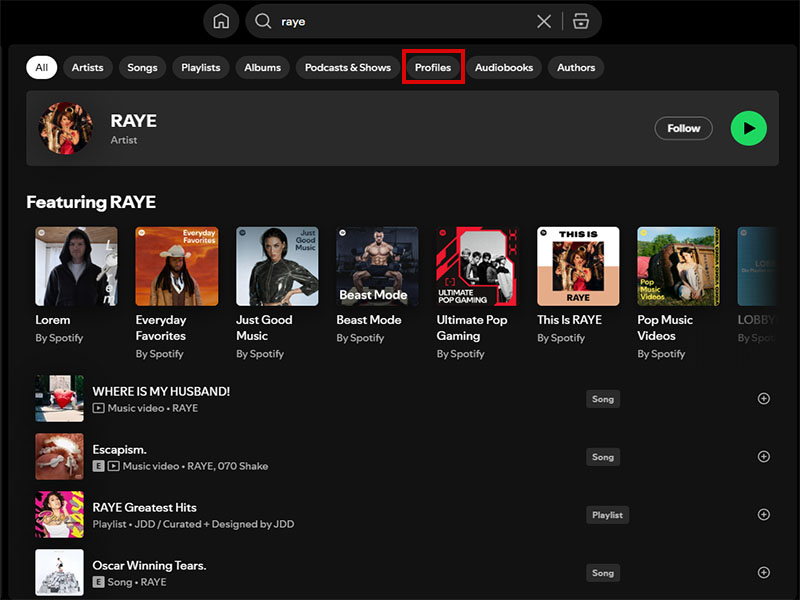
- Tap or click on their profile to open it.
- Select the Follow button beneath their profile name.
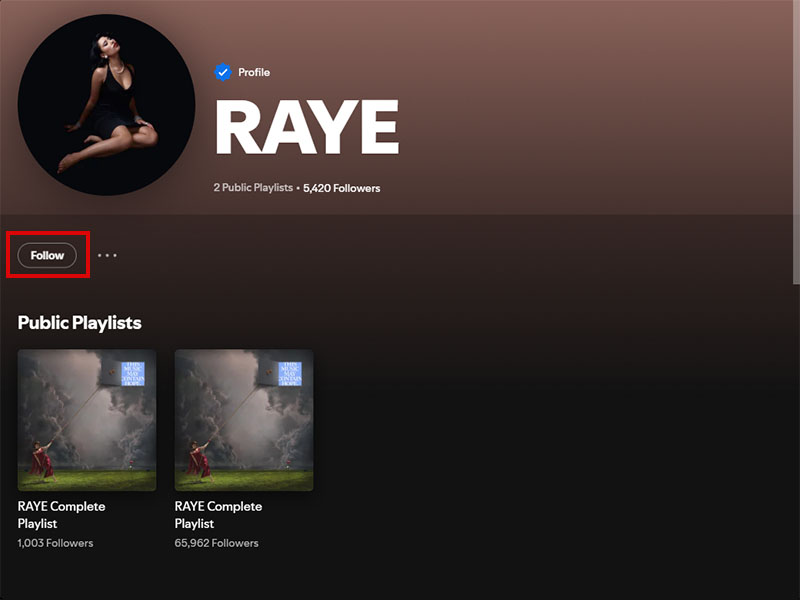
Once you follow on spotify, their public playlists and recent listening activity will appear in your Friend Activity feed (desktop only) so you can discover new music from their tastes.
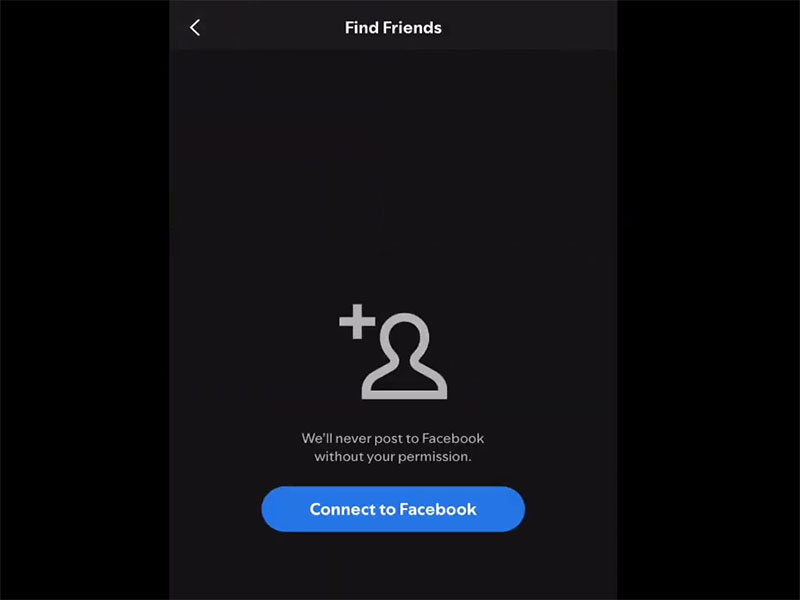
Method 2: Find Friends from Contacts or Facebook
If you’re not sure of someone’s exact username, you can still find people you know by connecting your contacts or Facebook account. This answers the common question of how can you follow someone on spotify you know in real life:
- Open Spotify Settings and go to the Social section.
- Choose to connect your Facebook account or import your phone contacts.
- Spotify will match your contacts to existing Spotify accounts.
- Browse the list of matched friends and tap Follow next to any account you want to add.
Method 3: Follow from Playlists or Comments
You can also follow users directly from public playlists or community spaces:
- If you find a great playlist curated by another user, click their username below the playlist title to open their profile, then hit Follow.
- On collaborative playlists, you can tap any contributor’s name to visit their profile and follow them.
How to Remove Followers on Spotify
If you have unwanted followers, spam accounts, or just want to tighten up your privacy, you can remove followers on Spotify in just a few steps. Unlike some social platforms, Spotify does not have a dedicated “remove follower” button on all versions; but you can achieve the same result by removing the follower directly or blocking their account.
Here’s how to remove followers on spotify across devices:
1. On Desktop or Web Player
- Click your profile name in the top-right corner and select Profile.
- Click your follower count to open your full list of followers.
- Find the user you want to remove and click their name to open their profile.
- Click the three-dot menu button below their profile name.
- Select Remove this follower (on newer versions) or Block (on older versions).
- Confirm your choice in the pop-up window.
The user will immediately be removed from your follower list. They will not receive a notification that you removed or blocked them.
2. On Mobile (iOS & Android)
- Open Spotify and tap your profile icon in the top-right corner of the Home screen.
- Tap your follower count to view your follower list.
- Find the follower you want to remove and tap the three-dot menu next to their name.
- Select Remove this follower and confirm when prompted.
If you only want to hide your listening activity without removing someone entirely, you can also set individual playlists to private or enable Private Session mode. This lets you control what your followers see without removing them completely.
Why Can‘t I See Someone‘s Followers
If you can’t view another user’s follower list, it’s almost always for one of these reasons:
- Their account is private: This is the most common reason. Users can hide their full profile, including followers and listening history, in their privacy settings.
- They blocked you: If a user has blocked your account, you will not be able to view their profile or follower list at all.
- You’re on mobile: As noted earlier, the Spotify mobile app often only shows follower counts, not the full list of users. Switch to desktop or the web player to see the complete list for public profiles.
- The account is an artist page: Official artist accounts never display their full follower list to the public.
Final Thoughts
At the end of the day, Spotify Premium is built for ad-free listening, offline downloads, and better audio quality — not extra social spying features. You cannot see someone else’s hidden followers just because you pay for Premium, and that’s by design: Spotify prioritizes user privacy over granular social data.
For public profiles, you can view follower lists for free on desktop or web player, no subscription required. And whether you’re learning how to follow someone on spotify or figuring out how to remove followers on spotify, all the core social tools work exactly the same for both free and Premium users.
If privacy is your main concern, focus on adjusting your own profile settings, making playlists private, and removing any unwanted followers — you don’t need a Premium subscription to take full control of your Spotify social experience.


